Showing posts with label andover. Show all posts

Sunday, November 2, 2014

Andover Innovation Lab & Instructional Technology Update Andover High School Week Of October 27th- 31st 2014


What a great week to be back after a rejuvenating MassCUE conference at Gillette Stadium! At Andover High School we are really in the flow of integrating Google Sites, Google Classroom and a variety of other technology tools into the classroom.

Class Charts Seating Chart App
 I will start off with a share that I got from researching the ability to create class seating charts online with World Language teacher Jen Deschenes. The Chrome Application which is an application available in the Chrome web store on the Chrome Browser named "Class Charts" allows you to create web based seating charts for your classroom. It is simple to use and will help you create multiple class charts in a jiffy.


Health/Physical Education Department
On Monday I had the opportunity to work with the entire Health/Physical Education Department on the creation of their Google Accounts,what it means for them and how they can begin to create,share and work with students using the tools of Google Drive.


They were a great receptive group and many had great questions about getting started in simple ways. My suggestion for many of them was just using a single doc for their continuing update of homework assignments.

Mike Messina
Diagramming for Game Development
In the Digital Learning course Game Design Michael Messina is developing lessons which encourage students to look at the format in which games are developed with HTML5 for the web. Michael Messina has engaged students on a variety of project development concepts in both Web Design and Game Development and we are excited to see his projects through the semester.

Here is Michael outlining the pixel dimensions for students of a web interface of a game.

Karen Stevens
Karen Stevens Entrepreneurship course has been delving into the creation of business plans for their projects. Karen has been developing rubrics which will help students envision their business projects in terms of the key concepts of a business plan. The students have been excited to work on their own ideas and problem solve their concept development.


Dan Brennan & Bryce Work to update iPads
The help desk has been busy updating the iPad cart for the Social Studies department and preparing their formative projects for review. Be sure to check put their most recent blog writing which includes their perspectives on the MassCUE conference and their project work.


Librarian John Berube fresh off MassCUE has been suggesting some great new tools for staff to use in addition to the many research tools such as Ebrary and Boston Public Library tools he already administers. One tool he found was the presentation tool Emaze which can be alternative to other presentation tools such as Goolge Slides, Powerpoint and Prezi. Emaze's features include a very graphic interface for content and many nice templates.

Google Classroom Interface
Tom Powers has continued to power through the use of Google Classroom engaging his students with
the assignments and the ability to submit them online. He has pioneered the use of the platform at the high school and has begun using the high school lab as a tool with classroom to submit the students audio recording as assignments through the use of web tools such as Vocaroo which enables students to record their voice online and send a link to Mr. Powers in Google Classroom.


Jen with her Memes
My week ended with a great meeting with Jen Deschenes on fine tuning who has included the use of student created memes in her classroom to have students quickly form sentences using a "meme" app on their phones. Memes are small photos with text added to give context or create communication.

Jen is also using Google Drive to store student created audio files for quick sharing within folders on her drive.


Tuesday, October 28, 2014

Andover Innovation Lab & Help Desk:Taking Over The MassCUE Conference!!

On early  Wednesday October 22nd 5 students left early and  travelled to Gillette Stadium in Foxboro,Masachusetts from Andover High School as members of the Andover Innovation Lab and Help Desk to be part of the MassCUE(Massachusetts Computer Using Educators event in the form of the student help desk featured in the main concourse. The students participating were Eli Gukovsky,Ari Primak, Will Owen and Bryce Corbitt.


With the assistance of Dan Downs and Dan Brennan the students set up a video which promoted their endeavors at the help desk and helped outline the curriculum which they are part of at the high school. The video below helps outline the process of the Andover Innovation Lab and Help Desk.


This was a great opportunity for the students to better understand the huge movement they are apart of which empowers students to use technology more efficiently with teachers and enables them to work on their own innovative technology driven project. Students had an opportunity to network with other teachers who use technology as a main part of their instruction. 

The students also had a visit from Andover Public Schools Superintendent Dr. Marinel McGrath who visited and chatted and tweeted out her visit with the group.


I was also able to present the Andover Innovation Lab curriculum to a roomful of teachers eager to see how we work on our projects and use blogging as a reflective form of the process. The presentation below outlines the design of the curriculum used at the help desk and provides an overview of several of the students projects. This was a highly beneficial opportunity to share what we do at the Andover Innovation Lab and how this model continues to evolve as we integrate technology in the district.


Sunday, October 5, 2014

Instructional Technology Weekly Update-Andover High School & Wood Hill Middle School-Andover Innovation Lab September 29th-October 3rd 2014


This week we I the opportunity to learn more about Nettexts at Woodhill Middle School. Sara Mensale the Digital Learning Specialist at Woodhill Middle School and I participated in professional development with several groups of teachers from the school. Nettexts is a web based application for a variety of platforms which enables the creation of lessons,units and entire curriculums using Open Educational Resources often called OER.  It was great to get a refresher on how this software can help manage open educational resources for teachers who want to implement them into their courses.


At the Andover Innovation Lab and Help desk we had a busy week with students preparing their Project Development Forms which help them outline three formative projects they will be working on over the next several weeks. All of the students are very motivated to work on this phase of their projects and they have all been so productive this semester so far. I really expect that in this phase we will really see their projects take shape and they will start to see their research pay off. This week Andre D.  is a student of the week he has been busy working on his Android Studio project and is finding resources to get his project moving.

To view these documents and the students blog please visit:
http://www.andoverinnovation.com


All of the blog entries found on the website this week will relate to the students ability to complete the Project Development Form and give us more insight into what their thoughts are about their projects as they move forward. Take a minute to view the finished blog entries on the website and read all the entries for this week.  The students  have all shown a great level of interesting applying technology to their learning.


In terms of assisting teachers around the high school this week Bryce Corbitt started with updating the iPad cart for the Social Studies department. Bryce was eager to get started with this and learn how the iPad's could be updated and how new apps need to be added to the iPad's and need to be cleared for new projects. He will continue working on these projects for teachers in the next coming weeks. Be sure to check out my screencast video of the expectations of this week's work and what the potential projects and items on our to do list where.


This week Dr. Lord decided to share out many department members websites that have been in the development over the past couple weeks. Here is a  link to his blog which contains the links he shared out in the past week. 
Dr. Lords Blog
I had a great time collecting them from teachers. With speaking to teachers about these blogs I had great discussions about the content and the direction they were thinking of taking. In the past week I've also had an amazing opportunity to begin the training of some of the high school teachers with the use of Google Sites and Google classroom.


Many teachers have decided to build websites not only by working with me but also taking the TechByte  trainings with Joanne Najarian at the central office on Tuesdays. I've begun to introduce teachers to the classroom and how the documents can be easily shared amongst each other. I think one of the huge benefits of working with in the high school so closely is my opportunity to sit down with teachers in their break rooms and discuss how I can help them with technology. One of the departments that I've gotten to know more closely is the World Language Department in which we can share a variety of strategies for organizing audio files and also creating websites to help them teach. We have also worked closely to create forms for students to submit information for quizzes and surveys in a variety of languages.


This is an exciting time of year with teachers and technology. We are in a time of great experimentation and transition. Each week I see a transition of skills and adaptability to use technology in the classroom.


Sunday, September 21, 2014

Andover Innovation & Instructional Technology Update Week Of September 8-12 2014 - Google Galore At Andover High School!!!!

The Andover Innovation Lab students have been busy pushing things forward and developing materials for students and teachers to adapt to the use of new technology. I began working with Eli Gukovsky on a script to help teachers sign out laptop carts using a form from their computers. Eli is using Google scripts which is a web based coding platform built into Google Docs which enables the documents to work together to move data for different uses. For more information I highly recommend this link from the Google team which explores the use of Google scripts more in depth.

Overview From Google I/O

Developer Quickstarts From Google


We have enabled students to post their blogs as authors this year which has streamlined the process of our collaborative blog. Students can now work on their blogs in docs and post as they please and wait for approval. This has enabled me to better manage the blogging part of our program and empowered the students with access.

Andrei Dumitrescu has begun the download the components of the Android Studio to his personal laptop. Android Studio is the Android Platforms web based development environment for mobile applications which updates automatically and supports the newest version of Android. I look forward to supporting Andrei as he begins work with this platform. We are also lucky to have other students who have experience working with the platform from last years help desk.
Adam Yee is translating his interest in Sports Statistics to a project in the Andover Innovation lab. it is great to see a student translate skills and interests from different areas into the application of technology. He is currently finding ways to present the that he is collecting and working on organizing it as a technology driven project.


We closed the week working on  video series on Turnitin software and also Google Groups. We completed both of these projects and look forward to seeing the students work on their own projects this week and move them forward in the development phases to choosing formative projects.


Dan Brennan Video Production Teacher at Andover high School has been greatly beneficial as a part of the Andover Innovation Team. He has helped better integrate the use of video tools into our videos and help us document the student learning and experiences with video.

Andover Innovation Tutorial Lead


Teacher Development & Learning


The library has added an additional 3 carts of MacBooks for the Computer Science, Science and Writing Lab. These carts will be an invaluable resource for teachers being able to integrate technology into their classroom. It also solidifies the library as a learning hub for students.


I had the great opportunity of working with Diana Zawil on the creation of a blogger blog for her Spanish 2 courses. Diana had a great vision for what she wanted on her blog and just needed a little introduction to the Blogger platform to move forward. i was very impressed with her detail and choice of web 2.0 tools she integrates into her classroom. Here is a link to class blog which is fantastic!

Brian Shea integrated the use of Google Docs into his program with the National Honor Society. Brian created a form to share with all of the potential members of NHS to accept their application materials. He is also utilizing the features of Google Drive to receive video submissions from students. he is benefiting greatly from the efficiency that these tools have added to this process.


Jackie Salvensen worked on creating a working document to help organize her videos amongst teachers in the health dept. This web based document will enable with one clip to share the collected video links of her department. Her next step was beginning to upload her old Word Documents into Google Drive to Share.


Worked with Louise Cummings on calendars and collaboration in the Transitions classroom this week. She plans on integrating Google tools to share calendars as well as collect important information with Google Forms which will help organize her classroom. She is a huge fan of the collaboration ability Google provides with its tools. I expect that I will really see her classroom change as she moves forward.

We are really progressing with the use of technology and enhancing student and staff communication with the use of Google. Moving forward i can only see more of these tools being used as they truly simplify our worklflow in all that we do.

Saturday, September 6, 2014

Instructional Technology & Digital Learning Update Andover High School Week Of August 25-28 2014

Over the course of the summer I had d the opportunity to teach ,develop new curriculum and view the transformation of a variety of classroom and library spaces for the Andover Public Schools Digital Learning Department.

Summer Work
I taught a Web Design & Development course at Minuteman High School for 3 weeks which enabled me to review and research new tools for the new Web Development course  which is going to be rolled out this fall at Andover High School. The Web Design & Development course is one of 3 new courses which in include Game Development and Exploring Computer Science course. These courses are part of the newly formed Digital Learning Department at Andover High School.


As preparation for the new Exploring Computer Science course I participated in a great  training at Google in August with the new Digital Learning Teacher Michael Messina. We were
not only able to witness the “Google “ work experience but also got great training in making computer science more equitable for a wide range of students. The experience at Google was fantastic and getting to know many of the other teachers participating in this opportunity was extremely rewarding.


Early in the summer I was able to use mobile application development curriculum that I had been developing with a grant with the National Science Foundation and Bunkerhill Community College. The course uses video screencasted tutorials and sequenced code lessons to enable students to create an Android Mobile Application. This was a rewarding opportunity to begin teaching this curriculum  which I had been  developing with a former student of mine over the past year.

Teacher Successes 2013-2014
I was also able to reflect on the success of the teachhers with technology at Andover High School. So many teachers challenged themselves with adopting Google Docs and so many new web 2.0 tools to enhance their teaching. The students who participated in the first year of the Andover Innovation Lab produced so many amazing projects and experiences. Moving forward I have created a new website to showcase their writing and projects anoverinnovation.com. We are excited to be scheduled to present at the Masscue conference in October and be a part of their student showcase and help desk.


In addition to the new website we plan on having a theme introduced each year for students to investigate.  This year we are embracing the theme of creative coding. Students can research open source programming languages to create graphics. Students will have the option to pursue this as opposed to their own tech study. Additional new initiatives for the help desk this year includes a  plan to integrate group webcasts on instructional technology topics. We want to continually bridge the gap between students skills and application of technology and the teacher’s use in the classroom.

Prototype Classrooms
At the close of the last school year an opportunity arose to update 3 classrooms at Andover High School as well as the Media Center with 21st century learning furniture. During the month of August furniture was dilligently put together and represent three prototype classrooms. The classrooms are aimed to be models of furniture which supports learning with technology and also making classrooms more adaptable and flexible to group learning.


In two English classrooms and one math classroom students have some pretty cool new desks and tables. The library also has new tables and chairs are on the way to have a new 21st century feel to the space. Moving forward this library space will shift from a static space to one in which it will be easier for students to use their laptops and other computing devices to research,communicate and collaborate. We look forward to seeing this space transform.


Monday, April 14, 2014

Peter's Formative Project / Blog Post

The past two weeks have been spent on some of the finer details of my model. From rear-end engines to just creating basic shapes for the eventual details, the weeks have gone by pretty quick. The main model aspect that was the most challenging was the creation of a pneumatic piece of the model that had to attach to the back of the ship and to a floating object. The actual creation of shapes was easy, but connecting them together. However, the actual model itself looks quite bland from behind due to the stark lack of engines and other details.

The concept has very highly detailed engines and rocket pods hanging off of the wings and textures throughout the wings. As I have not gotten to these yet, it is hard to see the final product in what I have created so far. Hopefully when the engines come into being it will start to look like a real spaceship. The front end already looks really nice, and I added a beam to the very back end that really ties in the small details that I have added this week. This model is starting to come along nicely and I cannot wait until I have completed the model.

Crispin's Formative Project / Blog Post

During my time at the help desk, I have been studying  a programming language called Java.  I have learned enough to create two simple programs:  The Hello World program, and a program designed to drive the user crazy by having the user enter an infinite amount of numbers but making it seem like the computer will
eventually do something with them.

Learning is slow, and I have only memorized a few terms used in the language.  My prediction is that by the end of the year, I will be able to program simple things like calculators, and other things that don’t need internet in order to work, and nothing more.  The help desk itself has been okay even though there aren’t many people there on gold days.  I look forward to more time at the help desk, and I hope I  will accomplish more than I expect to.

Katherine's Formative Project / Blog Post

Things have been going really well so far! Learning HTML has been a  long project, but I think I’m almost at the point where I can make something that looks semi-legitimate. I say almost, because at this point I have a good grasp on a fair amount of the basic html-- but there’s still a large difference between theoretically knowing and actually doing. Sure, I can execute examples of the skills in isolated environments (check out that pointlessly elaborate nested table I created!), but I have still had very little practice in putting it all together, mainly because I don’t have a driving concept for my work. I guess I never really considered making a website, because originally I had my heart set on this whole “interactive infographic” idea, but such is the nature of an exploratory project, I guess! Unfortunately, now that I see how far off from my initial idea I am, I’ve reached a bit of a conceptual standstill. Code writer’s block, if you will. I definitely need to regroup, refocus, and re-plan, though the lack of inspiration is certainly not helping.

Until I reach a point of resolution on the creative front, I’ll continue working on learning new concepts and such from w3 schools. There’s always more to learn, and I should probably start working on external css and/or javascript soon, too. Plus, now that I’ve gotten oriented with html, I can now open up the page sources for any websites I find interesting, and use them as a learning opportunity. With every different website examined, I become aware of many more aspects of html-- yet another exciting but daunting prospect.
Though there are many variable aspects to my project right now, one thing is for certain; I definitely still have a long way to go.

Monday, April 7, 2014

Collin's Formative Project / Blog Post

In the past two weeks I have been using HTML to create a website. I have gotten a basic template to use as the platform for my website. The website has 5 pages, and all pages are going to have content on them. Along with potentially other () used to increase the quality of the site and rank it. So far I have enjoyed making the website and learning and practicing HTML as it is something I am familiar with.

For my formative project, I am going to show my website along with other attributes surrounding the website. Also, I will show the documents I have created using google docs. I look forward to completing and presenting my project to Mr. Downs and Mr. Griffin, and I hope that my project meets my own standards.

Wednesday, March 19, 2014

Ian Blog Entry for The Month of March


            For the past few weeks at the help desk I've been improving my skills with the 3D modeling and animation program Maya. I started using Maya two years ago but ended up taking a long break, so I had to spend the first few classes relearning some of the tools. The project I’m currently working on is a model of a robot, which I’m going to use to try and learn rigging. I just completed the first phase of my project, which was to make the actual model of the robot. The whole thing went well and I finished in good time.


            Soon I’ll be starting the second phase of my project, which will be to learn how to rig and begin rigging the model. I actually have never tried rigging before, but I've heard it’s an incredibly time-consuming process, so much apparently that I've been told I may not finish by the end of the term. I’ll do my best though and if I somehow manage to finish the rigging with time left I’ll make a simple animation with the robot.

Max Blog Post for the Month of March

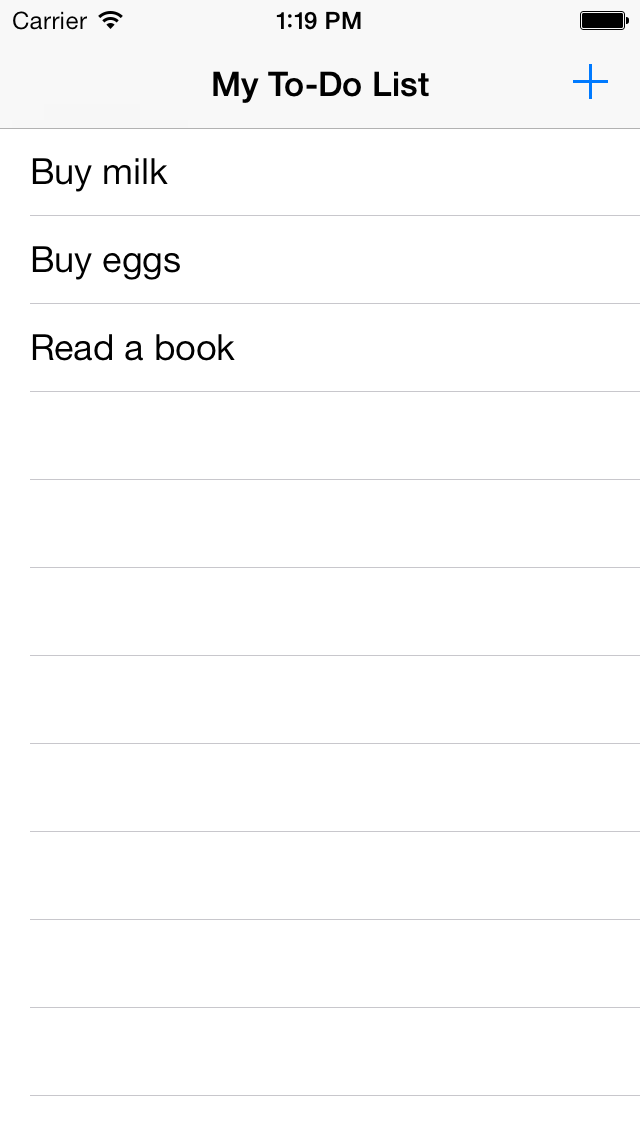
iOS Simulator Screen shot Mar 6, 2014, 1.19.27 PM.pngSo far at the technology help desk, I have gained a lot of knowledge about programming in Xcode. I have been able to program a basic to-do list mobile application. The app displays a list of to-do items and allows you to check them off when you complete them. You can also add items to the to-do list. To build the app, I watched a video tutorial on programming in Objective-C, which iOS apps are written in, and I followed the tutorial on Apple’s website for beginning iOS programming.

Moving forward, I hope to make other simple apps that utilize different aspects of iOS apps. Next I will work on an app that has more programming in it. My to-do list app had very minimal code, so I think that I will next make a calculator app. After that, I think that I will make an app that utilizes some of the phones hardware such as gps or Bluetooth.


Resources:

Monday, March 10, 2014

Nick Blog Post for the Month of March

For my project, I decided to code my own game. I looked into different coding languages, such as Hammer and Python, but decided to use Java, because I already have a small background using it. I learned about different classes and variables, as well as global variables. I also learned about different websites I could use to market my game if I was satisfied with the results, and found an online compiler called Browxy, which I can use to code with.

I created a flowchart for how my game would play, and then began coding. It took approximately two minutes to wonder just what the hell I had gotten myself into. I started by planning out a rough sketch of how the player would progress through the code, and began programming the different classes. I then wrote out how the Main class would work, and started to code it. I am currently almost done with the basic skeleton of my code, and plan to start having people test when I finish.

Saturday, February 8, 2014

Collin McDonnels Andover Innovation Lab Project: Creating A Website

My name is Colin; I have been working on W3 schools reading guides on HTML. I also read a guide on search engine optimization which was a PDF file from Google. I have enjoyed my time so far at the help
desk because I can work on what I want to work on and am not rushed. I am also given choices on what I want to do with my time.

I will be making a website using HTML and will then use SEO techniques to rank it. I have been planning what to do the website about and how I will implement SEO on it. I still need to plan and learn further before I am capable of completing my goal. The finished product will hopefully be done by the end of the year, which will consist of a website and SEO. 

Peter Bantas Andover Innovation Lab Project: Aircraft Model

My name is Peter Banta, a Junior working at the AHS help desk. These past couple of weeks I have been working with a program called Autodesk Maya 2011. This is a 3D modeling and animating software that I have used a couple of times over the past 3 summers. I really have enjoyed my time in the Help desk, but have yet to

go out on any technology related problems around the school. I think that that would be very informative as to what extent technology is used in our school. I know that most (if not all) rooms in the school have a projector/smart board now. So if we aren't really using those devices correctly it would seem like a waste.

The project that I would like to make with Maya would be a combination of modeling and animating. Currently, I have been working on a spaceship that I found pictures of online. It is a model from a game called Star-citizen that I thought looked really cool. Hopefully, based on the level of difficulty that it takes to complete this project, I would either do a higher difficulty model for a final project. Or, if the model I'm currently working on proves to take a good amount of time, I would make that my final project. I think it would involve both new and old skills learned to complete these projects, so it would be a great final project. Overall, the Help Desk is looking like a worthwhile investment of my time, so I look forward to all the good times to come. 

Parth Valechas Andover Innovation Lab Project: Headphones Business Development

My name is Parth Valecha, a sophomore at the Innovation Help Desk. I've always loved listening to music and I always have a pair of headphones on me. I love headphones the same way some people love cars, or shoes. Even though I only have one pair, I'm always on the internet looking at new headphones from my favorite companies. I always want to listen to music, especially during rowing practice. I love rowing and
having some pump up dubstep helps so much. But the problem is carrying a phone and headphones with a cord is not only restrictive, its also dangerous. So because of my love for headphones and rowing, I aim to design headphones that I can row, run, swim, ad workout with without any problem. My solution is to have high performance and high stability headphones with a mp3 player inside it. I can play music straight from my headphones so a phone and wire is not necessary. It will be designed to provide complete comfort, and be exremely reliable at the same time. This way I can row while listening to my pump up music.

During the help desk, I have been researching marketing and product development information. I plan to soon develop a basic business plan on my idea. Im able to stay focused furing the help desk. Although I am not always extremely productive, I am able to get work done and go farther with my idea than I normally would with the help desk. It is really helpful, and without it I would never even think of writing a business plan on the idea already. Hopefully I can get my thought out on paper and show everyone the product I envision.

Ben Hunts Andover Innovation Lab Project: Creating a Website

My name is Ben Hunt. I am a junior at Andover High School, and I'm really optimistic for the opportunities I will have with this class. My initial hope was to create some sort of project which would involve computer
science and graphic design. These were two classes I took last semester that I enjoyed. My goal was to create a project that would expand my knowledge in these fields and enjoy what I am doing.

I believe my plan is to create a website for a game. I hope that I can program this website as well as a game that I can put on the website. This seems like the best solution to hitting both of my fields of interest. Although I have taken similar classes, this will be a new experience for me. There will be a lot of research to be done before I begin the actual work. Despite the potential difficulties, I am very excited for this project.

Thursday, January 9, 2014

Experiences In Using Recording And Editing Software For Online Video Production - Vaibhav Patel

Creating videos is a really resplendent experience, but there is a lot of research that goes into it. The first steps that go into making a video are making a script and researching about the content that will be put into the videos. After researching and finishing the script, it’s time to record the video. While recording, there will be times when you mess up, and do it over again. Once done with the video recording, comes the editing part. Basically, this process takes a lot of time, especially the rendering part. The most frustrating parts are researching and editing (rendering).

I use programs like fraps or Dxtory to record, and after effects and sony vegas to edit the videos. Editing is what makes the videos look really good. Fraps and Dxtory export the video file as a .avi file, so I import them into vegas/after effects and make the video better by adding text, related images and adding effects to make the videos look cool and then finally i render it as a .mp4 file. These programs are not free, they do cost quite a good amount of money. There goes a lot of grammar content while creating scripts, such as making sure everything is structured in a easy to understandable way and spelled correctly. After everything is done correctly, watching the final product is fun!

Friday, December 20, 2013

Why Minecraft is Useful for Teachers and Students / Viabhav

I had a lot of fun this month working with the new crew at the Andover Help Desk. Since the new Intern, Zachary, came in to provide a helping hand to Mr. Downs, things have been able to progress a lot more smoothly. The calls for help by teachers were decreasing this month, which is understandable due to the upcoming vacation. I started working on a few projects this month, teaching Mr. Downs Minecraft (he failed at it), making videos that explain why Minecraft is a good teaching tool, and brainstorming down ideas for my final project, which is going to be about developing a Minecraft mod, how much time it takes, and tutorials of a few codes that can help along the way. I think my project will inspire people to use Minecraft as a unique method of understanding design like it did for me.


My projects are mainly focused on Minecraft as I believe Minecraft gives people the potential to do anything. Minecraft has inspired people to learn about animations, coding, music, and even starting a business. Minecraft is not just a game but a huge learning tool for anyone with the passion to further their goals. Minecraft has changed many lives, including mine. I would've never known how to code or animate if I hadn't played Minecraft.

Friday, November 22, 2013

An Introduction To Net Texts Online/Flipped Classroom Learning Platfrom

The uniqueness of Net Texts is the ease of applying outside content to the organization of units or lessons online. Net Texts enables students and teachers to work from one portal and simplifies the process for teachers who want to work from one device or are part of a district 1:1 implementation. Net Texts has integrated a variety of different tools from the web such as Khan Academy,CK-12 and made these resources easily searchable for teachers. The interface allows for adding content in an organized efficient ways and streamlines the process of adding videos,lectures and course documents and assessments in purposeful and meaning full ways online. Teachers have access to existing web based course collections as well as the opportunity to design the course from the bottom up using resources collated from the web.

The Net Texts students view on devices(Android,Ipad application) is organized and clearly outlines the course content,videos and documents. Teachers can receive emailed spreadsheets of student results in their portal as well. Like many current note taking applications Net Texts interfaces are consistent between devices and enables students to quickly add notes and find course materials efficiently.

Net Texts is ideal for districts looking for a singular interface for students to interact with course content and also streamlines how teachers organize online content. This tool is ideal for balancing the learning curve for teachers in creating a flipped classroom mode and enables sharing,content management and specific subject area materials. This tool is even more beneficial for teachers who truly know how they want to organize their flipped model and can draw their course materials from previous materials(speadsheets,docs,pdf) and have a strong plan for the organization of lessons and what resources will be necessary to teach a lesson and keep it aligned as they move forward. Newer teachers would want to plant specifically around the content they may want for their course before they fully committed to designing the course. 

The application has a main dashboard which allows teachers to mange what content and what web based materials support the flipped classroom instruction. Different flipped models could be used with this tool as well and instruction could be based on singular components of media being assigned for homework and then viewed in class or a teacher could develop a hybrid based on the accessibility of tablets or computers for student access and use Net texts as tool to assit in connecting to specific material.

Ultimately it is still up to the teacher to create the collaboration this tool would bring to the classroom. Teachers need to find resources which support their instruction or have additional professional development which supports them in creating screencast videos or managing a variety of web based documents such as pdf's,images and docs. 

Net texts supports the integration of OER resources(open education resources) in order to help organize teachers in developing content and choose sources. Some of these source which can benefit a Net Texts users are CK-12 for the sciences,www.net-texts.com/collections,Khan Academy and the OER Commons located at http://www.oercommons.org . Net texts is looking to assist in applying these resources to their platform as quickly as possible to assist in integration of their platform.

One of the largest  benefits for this platform is the ever evolving development of trusted web based materials which teachers can search and utilize quickly to develop a new course or assist a teacher created lesson.  After attending a training with the Net Texts Marketing staff I could recognize their commitment to embracing the use of the Creative Commons and building in this important component into their tool. Their staff highlighted in their presentation several videos and engaged in rich discussion about this feature. I have included links to this information as well as Net Texts youtube video. 
search.creativecommons.org
Mowhawk Video video on Creative Commons
Net Texts 

Thursday, October 31, 2013

MassCUE 2013- Andover Student Help Desk Experience- Vaibhav Patel

Meeting 30 Hands Learning Owner-Eric Braun
We went to Mass Cue Conference, at first we went looking for the 30 hands learning vendor, but we could not find it at first, so we went to the vendors and met the exhibitors and learned a lot of stuff about technology, I also did Virtual Welding. We also tried to get some internships and connections to people associated with IT. Before lunch, we found the 30 hands learning vendor and met Eric Braun, Owner of the 30 Hands Learning, and he gave some nice advice about using technology for myself, and it was useful. Then we had to eat lunch and finally after that we went to work the Einstein Bar, where I assisted people with technical Issues, so basically a help desk. There was one lady that came for help, her problem was that she couldn’t turn up/off the sound in her Mac. Overall a very rewarding experience and great to meet so many entrepreneurs and see the range of employment opportunities in technology.