Showing posts with label google docs. Show all posts

Wednesday, March 19, 2014

Sara Blog Entry for the Month of March

Hi Everyone! Just wanted to update you on my website progress. With help from Mr. Downs, I now have a template that I am using for each of the pages. I picked out the color scheme and the
pictures that I will be using. Also, I am planning on creating my new logo soon. I learned a lot of new code, which is posted below. I now know how to change colors, as well as create new boxes on the screen.
On a side note, I was recently selected to represent Andover High in a Cake War where I will be designing a cake that is Andover High School themed. I will be competing against a few other schools in surrounding towns, and all of the cakes will be posted to Facebook. The winner is chosen by who receives the most likes on their picture. I am excited about this opportunity because I love how it connects my love for baking with technology.

Friday, January 31, 2014

Instructional Technology Update Andover High School Week of January 27-January 31 2014 -Daniel Downs

This week at the Andover Innovation Lab & Help Desk we got off to a great start with the addition of 10 new students beginning projects using technology. The student projects range from learning Java, creating websites and also developing business plans for innovative products. In the next week we will be posting blog entries from the students describing their first week at the help desk/innovation lab.


Some of these students have been able to assist teachers in their role at the Innovation Lab/Help Desk  with a variety of technology. Students have assisted in setting up wireless projectors,adding email accounts to phones and downloading the Chrome browser on the new MacBooks.


Students at the Innovation Lab are also piloting the use of district based Google Drive accounts. Students in the lab will be urged to use these tools to assist in their research,share documents,videos,images. At the end of this semester we will ask students about their use of these tools and use their opinions to help develop a list of benefits these tools can bring to the district.

Photo:Help student Viabhav Patel installs PC for Innovation Lab students at help desk.


This week I worked with Adriana Gonzalez a teacher in the Foreign language department. I assisted Mrs. Gonzalez with creating shared Google Documents which contain her course homework. These documents enable real time updates of assignments and provides a consistent and reliable link for parents and students . Using a link shortener named Bit.ly we were able to also shorten the Google Links to personalize and shorten links. These links were then placed on the X2 portal.


Teachers are also beginning to use Google Groups to create collaborative web portals for students to ask questions,post comments and share acquired knowledge. The groups enable teachers to organize a collaborative web based environment on individual emails. Students and the teachers are sharing information simultaneously and are notified whenever someone adds to the discussion. These groups are widely used in higher education for collaboration I have included the link from Brown University who uses these groups consistently.

Link To Brown University Google Tools Site


Lauren Ream Social Studies teacher has ambitiously developed a blog to host her course materials this semester. Mrs.Ream has organized her course materials and hosted a variety of web based documents using Google Drive on her Blogger blog. Over the course of the semester she will have students commenting on discussions directly in class and will also enable students to share quickly and efficiently the course assignments and homework postings.


I was able to work within Mrs. Reams classroom this week and assist her with adding existing lessons and editing them to be posted on the blog. We also added students to become readers of her blog.  Her students blog posts engaged students with not only with learning technology skills but also improved engagement with her content. At the end of the class students could scroll through student responses and view a variety of opinions related to subject matter content. These changes will enable Mrs. Reams class to continue to develop  web based lessons and ready access to assessments.


In the coming weeks I will be offering out to teachers
more technology training after school to assist in understanding their MacBooks “System Preferences” and “Commonly Used Web Apps” such as Evernote and Skitch.
Additional training opportunity will include beginning teachers with Google Drive and Documents. I want to enable to teachers to improve their adaption of tools to their existing lessons and classroom environments.

Friday, January 17, 2014

First Experience With Google Hangout's At The AHS Help Desk / Zachary Griffin / IT Assitant

     Of the many useful tools Google provides, Google Hangouts is an icing on the cake, as it not only allows you to video chat with your friends and co-workers, but it also doesn't even require an install! As Hangouts is a Google app, you simply plug it into your browser interface and you can chat with your friends in seconds. As with all of the other Google Apps, Hangouts is completely free, and so long as you have a Google account, you have complete and unlimited access to its features. 


    On Wednesday at the Andover Innovation Lab, I worked with both Eli and Dan on a Google Hangout, where Eli showed us his work on his app that he had developed during his year in the Help Desk. Dan and I watched as Eli presented his questionnaire game using Google tools and other online resources for the presentation. In order to make Google Hangouts feel authentic, we were each put into a different room in the Library apart form each other, so it truly felt like it was a real professional online session. Eli did an amazing job, and hopefully other students and faculty will get a chance to watch the session on YouTube. 

     Viabhav, being another long time student of the Help Desk, also presented his project on Thursday, using Google Hangout. Viabhav was assigned to show Mr. Downs, Eli, and myself how Minecraft, a popular crafting video game, can be utilized in schools and provide unique learning curves for students wanting to learn professional fields in software development. Viabhav went over all the need to know information for people getting familiar with Minecraft for the first time.

    Video online sessions are very useful in that they allow you to get to know someone without having to either call them or meet them in real life. Jobs in today's market are pushing towards a more virtual based environment, and the Google Apps enable a lot of the most convenient ways for people to do this. As the next semester rolls in with our new group of students; the Andover Innovation Lab can look forward to doing several more Google Hangouts in the future.


Learn more about Google Hangouts here:

Link to our YouTube channel:

Thursday, January 16, 2014

Instructional Technology & Digital Learning Andover High School Week of January 13-17

Instructional Technology & Digital Learning Andover High School Week of January 13-17
Daniel Downs


During a week in which most teachers are preparing for the end of semester exams many teachers are still working at integrating a variety of tools into the classroom. I had a chance at the last faculty meeting to present some of the components of using Google Docs with files and some of the benefits of collaboration with these tools. Being able to share these tools has opened up a variety of conversations with teacher’s which has extended from just creating Gmail accounts and exploring the collaboration features to developing Google Forms for Assessment in the classroom.


Teacher Highlights:

Teachers in Foreign Language are integrating variety of podcast tools in the foreign language department to help students learn language. Students can participate in lessons driven with native speakers and deep embedded vocabulary.


For the purpose of improving her connection to her students with web based content a teacher is developing a blog using the Blogger format from Google. She has developed a variety of lessons and media to support her existing curriculum. She will be rolling out the website in the new semester. I have had the benefit of working with her to develop the technology which supports her teaching methodology.


Teachers in the Social Studies department are in the process of reviewing web based tools in which to store and share links of curriculum content to share and collaborate with. Teachers were introduced to tools such a Wikispaces (http://www.wikispaces.com/), Portaportal (http://www.portaportal.com/), Urlist (http://urli.st/) and https://delicious.com . These tools can add layers of productivity and collaboration between teachers. For the document outlining these tools click here.


Teachers are beginning to integrate Apple TV into their classroom environments either by projecting their desktops to their class or using the built in applications. Apple TV is an additional piece of hardware which enables “sharing“of Apple devices (IPad, MacBook’s, and Phone’s) to the projector. This technology is particularly beneficial to classrooms in which has access to the IPad or MacBook carts so that students can project their device as well. To learn more about this technology check out this page from Apple.


Co-Teaching Experiences
I had the opportunity to go back into Karen Stevens-Mazmans' class and teach a web design lesson using HTML (Hyper Text Markup Language) and CSS (Cascading Style Sheets) for a marketing webpage assignment she is giving to students. Students are creating promotional websites based on a product. Click here to see her lesson write up. Going into her classroom is a great opportunity to share my skills and deepen the skills learned in the Marketing curriculum. It’s great to see the student’s interest grows as they learn how to code and change the appearance of websites.


Andover Innovation Lab/Help Desk
Students are in the final phases of their independent technology driven projects at the Innovation Lab. We currently have a student creating a mobile application (Eli Gukovsky), researching Minecraft in Education (Viabhav Patel) and learning the programming language Lua (John Makiej). These students will be presenting their final projects during the finals week in an online platform. For more information visit:


Teachers are well into the swing of adapting to all the new technology provided to enhance their teaching and learning. Wireless projection and understanding the intricacies of their new MacBook’s  is beneficial to student engagement but we also want to continue a deeper level of integration of a variety of web tools such as Google tools, Workspaces and a variety of Ipad applications which enhances student understanding of core concepts. In the Science Department a recent influx of new applications for their Ipad carts has enabled them to demonstrate Physics, Engineering and core Physical Science content online.


These updates are just some of the continual evolvement that is going on with technology driven initiatives at the high school across curriculums.

Friday, January 10, 2014

The Hour of Code Experience at the Andover Innovation Lab / Help Desk / Zachary Griffin

     When I first heard about the Hour of Code, I wasn't quite sure what to expect from it. I assumed many of the students would be working on something that they may find overwhelming and it would turn out to be a very uneventful week. However, I couldn't have been more wrong. The Hour of Code proved to be a much more important experience than I would have anticipated. Our first role at the help desk was to assist Mrs. Reidy with creating a shared Google Form so she could communicate with all students efficiently. We also created the bit.ly link (bit.ly/ahshourofcode) so students could access the document with friendly URL. 

     Dan Downs and I worked in the Library and several other classrooms supporting large amounts we were assigned to during the Hour of Code. Our role was to provide students with the link to the Google form and to begin students with specifically assigned activities for the Hour of Code website. When working with these students, we had our students from the Help Desk like Eli, Viabhav and John assist us in guiding students through the various tutorials. Our Innovation Lab/Help Desk students provided pointers to student on how to use the code games effectively and provided necessary support to code newbies.

     Many of the students did not quite understand HTML, Javascript or CSS, so it was generally expected that they were going to struggle a bit. However, the links to the Hour of Code website that Mrs. Reidy provided made the lessons much more entertaining for the students. Some of these videos included navigating an Angry Bird character through a field using pre-built HTML that players would move over into a drop box. Indeed, the lessons were simple, but informative enough for anyone inexperienced in code to understand.

     Overall, the Hour of Code is something anyone should take a part in. It's both a great way to learn how to code and a good way of having a little bit of fun. All the students did an excellent job in providing students in working with the tutorials chosen for the Hour Of Code. Many of the Teachers around the school did a wonderful job proving support in teaching their students during the Hour Of Code.

If you are interested in seeing the Andover High School Google Doc used for the classes, click on the link below:

If you would like to learn more about the Hour of Code, click here:

If you learn the Hour of Code, you may also even be awarded with a certificate that you can add to your portfolio!

Wednesday, January 8, 2014

Continued Development On An Adroid App / Eli Gukovsky

I have been spending a month here doing a lot of fun things. When I started doing this class, I expected a strict programming course, which I would smile and nod with, then go home and experiment with. Instead, I found that I could do all of my experimenting here, and I could get a feel for the technology that I wanted to learn in the same environment that I was actually learning it in. Mr. Downs and Zach have been nothing but kind and funny, with each of them having a very outgoing personality.
Early on, I decided to create a trivia game for Android, where the questions that are asked have no realistic answer that the user might know. This came as a combination of ideas from me and my friends. I love Android Design, so Android vs. iOS wasn't even a question for me. I've watched a lot of Android Design in Action (https://www.youtube.com/playlist?list=PLWz5rJ2EKKc8j2B95zGMb8muZvrIy-wcF), so the design itself wasn't a problem for me. I created a design using a Google Slides designer I found online a while back, and I finished designing the app. The next stage for me is to actually code the app.
So far, I'm really enjoying this class, it's the thing I look forward most to during my day.

Coming Back After Vacation / Zach

     After two long weeks of not being at the Help Desk, I developed ways I could improve my skills in Multimedia and be able to share that information with our students. After receiving Minecraft as gift from my girlfriend, I will be in a better position to critique Viabhav's Minecraft mod project, as well as promoting Minecraft as a useful teaching tool for future students that participate in the Help Desk.

    My first week back from vacation has certainly been an eventful one, between the teacher conference after school on Monday with Dan's Google Doc's presentation and the adjusting to getting back into the School schedule, I am more than prepared for what it to come going forward at the Help Desk. I would like to approach this month with an ambition to teach our students new and innovative ways to learn critical thinking when applying themselves to modern technology. 

Friday, December 20, 2013

Wiki Spaces Presentation at Wheelock College TSTT Conference

     It has been nearly a month when I began my first day at Andover High, and as I look forward to my two week break, I reflect on the time I spent working with Dan and the students on developing professional portfolio pieces in the field of technology. Between the flexible schedules, the presentation at Wheelock College, and the comfortable environment I work in, I can safely say I will not shudder the end of my two week break when the time comes. 

    As of right now, all three of our students will be developing their final projects over both the vacation and the first two weeks after they come back before the next semester. Eli is working on his app for the Android which he is moving on heavily, Viabav is continuing his progress on his Minecraft videos, and John is furthering his skills in code. With all of our students currently focused with interest on their projects, I am confident that they will work hard on their projects during their vacation.

     Here is a link to the program TSTT in Wheelock College, Boston. there I presented the importance of Google Doc's and how students can use them in a professional environment.

Zach

Sunday, November 24, 2013

Integrating Google Docs Into The French Foreign Language Classroom-Andover High School Instructional Technology

I recently had the opportunity to assist a French teacher with introducing Google Docs for creating a survey in his French classroom. Prior to me coming to his classroom and working with his students we discussed how we could use Google Docs so that students could share surveys that they create in French with each other more easily. The French teacher also wanted to streamline the process of having availability all of the surveys available on the web organized by class. This teacher was very open to the different possibilities of using Google Docs for integrating these surveys in his classroom.


Prior to me coming to his classroom the students typed up the surveys in Word document format. To assist this teacher I came into the classroom to coteach and show the students how to create a Google form and how to edit the different types of questions and explain how they had many options. Students learned how to create a form, change the name of the form as well as choose a template for the appearance. Even though I knew Google Docs to be very popular tool amongst high school students I was very surprised that many had not created a form before. The students did a great job working within the Google interface and the options for forms is very intuitive and allows them to choose the different types of questions(multiple choice,text,paragraph,checkboxes,choose from a list). Form questions also enable for adding help text to each question and also gave an options for whether or not the question was required or not.


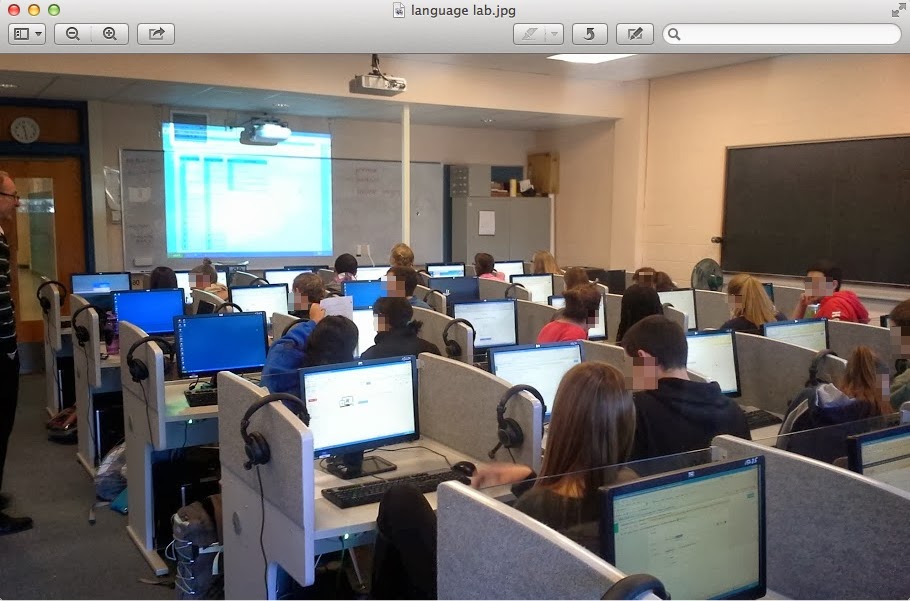
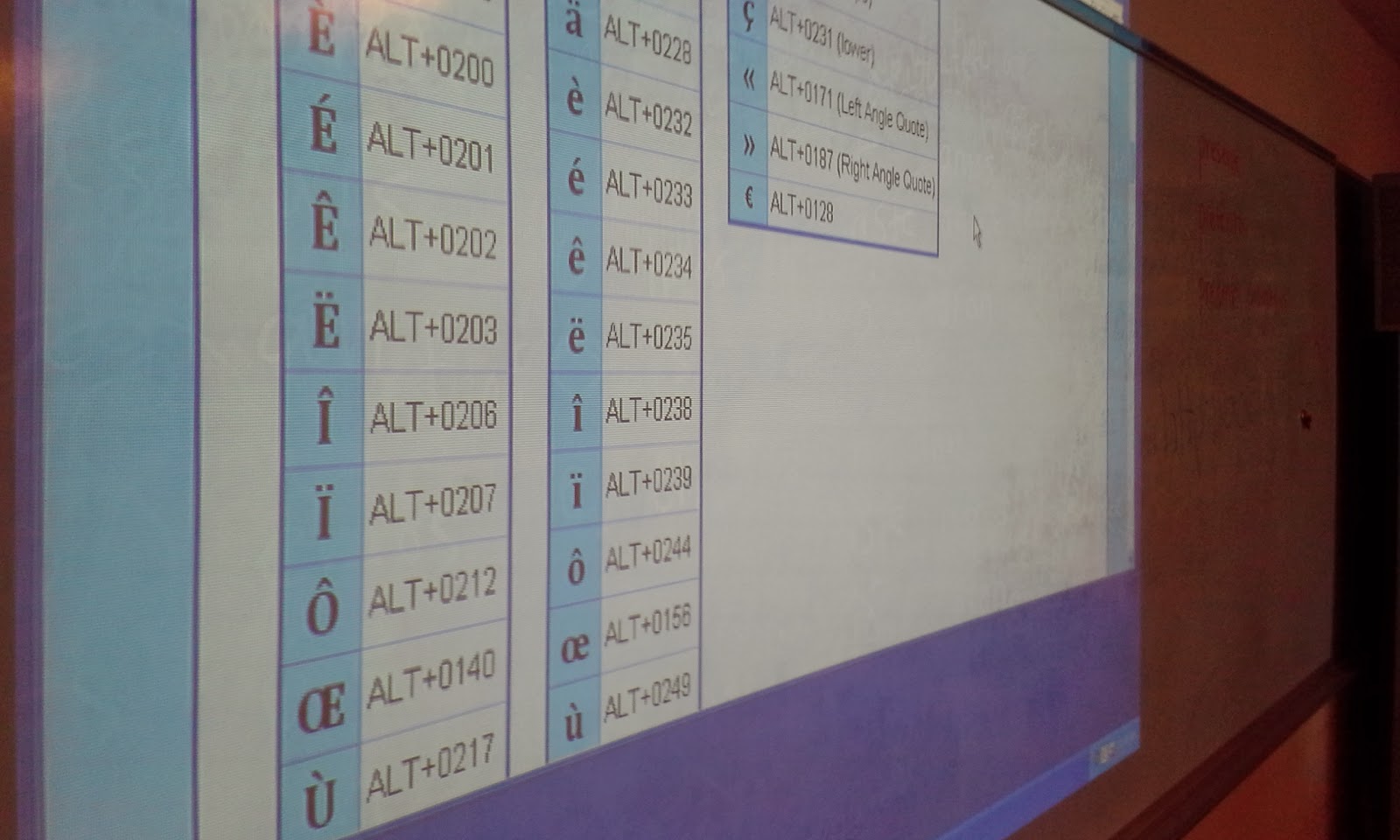
One of the most interesting components of this lesson was teaching students how to add the accent to specific letters in the French language using the American keyboard. We used a webpage with the keyboard shortcuts on the board to assist students with what they needed to type in order to get the accent to show. Many students entered their survey questions in a very expedient way and successfully created their forms. I then was able to show them the live link in which they could then share their form with anyone. I had them copy their link and add it to a document in which I shared with them. Students enjoyed editing the document collaboratively and seeing live the addtion of each survey to the shared document. The final document had all of their surveys links and names on it. I shortened this link and made it so the French teacher could then share these surveys with another class in France to comlete so that the American students could review the responses.


The students in this class were now easily able to share their surveys with each other and were able to practice creating them using a tool which was intuitive and allowed them to create a variety of questions(multiple choice,text,paragraph,checkboxes,drop down,grid,choose from a list,scale). The sharing feature is valuable in that a variety of settings can be set once and editing by different people can be controlled. The person who created the form or anyone else can edit or not based on the settings. The form can be made available to the public or kept private. Google enables specific editing features for each document created.


The opportunity to use the language lab was a great benefit to this group of students. This lesson could be done in any computer lab or classroom which has internet access. Google Docs provides a great free way to create surveys or web-based forms in which you can collect data about a variety of subjects. It is very user-friendly and with just a few simple steps can be applied to almost any classroom. It can be used to help with assessment by creating test or quizzes or even in a flipped classroom model so that students can answer questions at home and then have a discussion about them when they get to school.