Showing posts with label Technology Integration. Show all posts

Tuesday, March 4, 2014

Instructional Technology & Andover Innovation Lab Updates February 24-28,2014 Andover High School

The state of teachers engaging in new projects with technology at Andover High School!

On Monday, the help desk received some older laptops to assist with projects for blogs, web development and using Google tools. Myself and the Lab Coordinator Zachary Griffin worked with Social Studies staff during their department meeting time to add links of resources, images and presentations which were organized according to different courses. The staff did a great job at learning how the technology worked and could immediately benefit from sharing between course and curriculums.Teachers have been very open about making regular appointments with me to learn more about Google Drive, Forms and Google Groups. 


The teachers are fine tuning their knowledge with Wikispaces and using hardware such as scanners and their interactive boards. I have spent the past week working with 5 teachers beyond the Social Studies department with improving their skill base with Wikispaces to enhance in their classroom web space.


On Tuesday I met with Dr. Allen from the World Languages department and we circulated ideas surrounding the creation of a website for the World language department at the high school. The page would focus on sharing the focus of the program at the high school and also spotlighting its great faculty. Myself and the help desk will provide the layout and we will work to get them started.

Paula Westmacott a Special Education teacher at the high school dove into learning more about using her interactive board when she with me on Wednesday. I was able to walk her through step by step related to the Epsom Interactive hardware, software and pens. She will be mainly using a series of websites and documents with the interactive board. She is excited to integrate this knowledge into her SMART goals as an educator and use it in a variety of collaborative classroom activities.Additionally, I was able to assist Physical Education teacher Carol Martini with the creation of a portion of her slide show for her “Warrior Way” program she will be presenting to students over the coming weeks. She made a great slideshow using her iPhoto tools and I worked with he in iMovie to add 2 different songs over the photos. She then embedded this video into her presentation.

Health teacher Holly Breen is using the sharing options within Google Drive toenable students to share work more efficiently and return feedback to studentsfaster. She has also adopted the Chrome Browser for the use of Youtube resources in the classroom as well.

 On Thursday I was able to attend a training based in the development of an advisory program at Andover High School. We read a variety of interesting and intellectually stimulating articles surrounding the development of students emotional and intellectual well being. We were also able to thoughtfully consider what a program the High School would look like and who it may serve. I look forward to being part of this process moving forward. 

Also on Thursday, a great article featuring the Andover Innovation Lab & Help Desk was published in the Andover Townsman. Dustin Luca included great photos from students projects at the help desk and highlighted some of the benefits we bring to the school.

Here is the link:http://www.andovertownsman.com/education/x1196458307/From-support-squad-to-innovators

To close the week I finished the final draft for a potential grant from the AEA for some Google Chromebooks for the Innovation Lab/Help Desk. Here is a link describing more about what this web based laptop has to offer students. We hope to integrate tools like these at the help desk moving forward and provide a model of success related to technology integration.

Friday, January 31, 2014

The New Semester / Zachary Griffin IT/Help Desk Assistant

     It's the new semester now, which means we now have our new influx of students showing up for the Andover Help Desk. It's been quite a busy week since the new arrival of students came into the Help Desk on Monday, there isn't a block where a student isn't learning about the newest innovations about technology, and that's exactly what Mr. Downs and I are excited about! Between working on subjects such as 3D modeling, Java, and HTML, there is nothing that the Andover Innovation Lab can't support its students on. 

         Among the many ways we approach to instruct our students, the most important focus they have is to use their own judgement on how a project should and shouldn't be. If a student wanted to develop a website, for example, it would be vital for him/her to use their own judgment on how that site should be handled. It's more than just creating a site, you also need to judge the work you've done, and commit to making improvements to them based on your own evaluation. Being able to self-evaluate is something the Andover Help Desk is committed to teaching its students. 

    As a recent graduate from a Technical Institute, it's in my interest to see our students going through a college like experience, from working hands on with their projects to learning how to take in constructive criticism to advance their skills in their desired field. Many of our students are seeking a future in a technology based environment, and if we can assist in guiding them to pursue that goal, I would say the Andover Innovation Labs help extends beyond that of an normal high school curriculum. It's been a pleasure working with these technology driven students, and I look forward to seeing how our future this semester unfolds. 

Wednesday, January 8, 2014

Coming Back After Vacation / Zach

     After two long weeks of not being at the Help Desk, I developed ways I could improve my skills in Multimedia and be able to share that information with our students. After receiving Minecraft as gift from my girlfriend, I will be in a better position to critique Viabhav's Minecraft mod project, as well as promoting Minecraft as a useful teaching tool for future students that participate in the Help Desk.

    My first week back from vacation has certainly been an eventful one, between the teacher conference after school on Monday with Dan's Google Doc's presentation and the adjusting to getting back into the School schedule, I am more than prepared for what it to come going forward at the Help Desk. I would like to approach this month with an ambition to teach our students new and innovative ways to learn critical thinking when applying themselves to modern technology. 

Friday, December 20, 2013

Wiki Spaces Presentation at Wheelock College TSTT Conference

     It has been nearly a month when I began my first day at Andover High, and as I look forward to my two week break, I reflect on the time I spent working with Dan and the students on developing professional portfolio pieces in the field of technology. Between the flexible schedules, the presentation at Wheelock College, and the comfortable environment I work in, I can safely say I will not shudder the end of my two week break when the time comes. 

    As of right now, all three of our students will be developing their final projects over both the vacation and the first two weeks after they come back before the next semester. Eli is working on his app for the Android which he is moving on heavily, Viabav is continuing his progress on his Minecraft videos, and John is furthering his skills in code. With all of our students currently focused with interest on their projects, I am confident that they will work hard on their projects during their vacation.

     Here is a link to the program TSTT in Wheelock College, Boston. there I presented the importance of Google Doc's and how students can use them in a professional environment.

Zach

Wednesday, December 18, 2013

Preparing for Christmas Break and Things I Learned / Zach

    My second week at Andover High went even better than my first, between the progress we developed on the Wiki's for students as well a furthering our goals to push the students projects ahead of the curve, I couldn't have asked for a better week. During my second week, I was able to assist Instructor's with help on their Mac books, which is a great opportunity for them to know that I am here to help! 

    As I look forward to my third week at Andover High School; I keep an open mind in what type of work I am encouraged to do at the LAB Help Desk. During this week I have obtained several useful bits of information that would look very well on my resume, and I have no doubt I am going to be getting the most I can out of a solid internship. 

    When I entered week 3 of my time as an intern at Andover High, I was tasked with instructing students in the Library about the Hour of Code and how to effectively use coding languages like JavaScript or HTML to further their goals in an evolving technology based world.

Zach

Tuesday, November 26, 2013

Benefits Of Creating Video Lectures & Screencasts-Andover High School Instructional Technology

In the beginning of the school year I had a teacher who is not going to be able to attend parents night but really wanted to connect with parents who came. Our solution for this problem was to have the teacher create a video lecture which contained all the major components of what he spoke about on parents night. The video lecture also contained a link to a public Google document which contained all the necessary forms that he wanted to get out to parents to know about. We then uploaded the video to YouTube which enable to another user to a play the video for what his parents showed up over the course of the evening.

This parents night experience was an interesting way to introduce the power of video lectures to a teacher. By learning how to screen cast lectures teachers can actually increase the amount of time that they have to do other lesson planning or introduction of key concepts to students. Video lectures do need some planning and should contain all the details that you want to have included in a regular lesson lecture. It is also important to require students to take notes and be prepared for a discussion.

It makes a huge difference how much time you spend practicing and preparing for the video lecture. A video lecture which is well-prepared and timed appropriately should include all the components that they would in a regular lesson but can also include links to web based surveys,documents or videos. A video lecture can be loaded with links or assessments which students can prepare for classroom sharing and communication. Performing a few practice run throughs will also improve the quality of your voice and detail to which you can talk about things.

The best part of video lectures is that the tools to make them are free and readily available on the web. My favorite tool for creating video lectures and presentations is Screen Cast O-Matic. I started off with the free version of the software and was very impressed and allowed me to create presentations videos which were 15 minutes in length. I was able to share them and also upload them to YouTube so that I always had a place that I can link them from what I share with my students more quickly. There is also a pro version of screen cast O-Matic for $15 a year. I recommend this version if you are really into adding text, editing your videos more concisely or longer recording time. The pro version also removes of the watermark on the screen that says Screen Cast O-Matic.

If you use the iPad your courses you're definitely going to want to check out an app called Educreations. This application allows you to record on your iPad screen and import images create text and do a variety of speaking over what is projected onto your iPad screen. I recommend this application especially if you work on the elementary level and have some key lessons with you continually use over and over again. If you do a great job of planning out your lessons that you want to show on educreations they could be a great resource for you and also for other teachers you can find them available on the web.

With the development of online classrooms using the flip classroom model I think you going to see more and more teachers using screen cast or video based lectures. This type of sharing of your lectures is great to share your work as well as enable students to have access to your lessons anywhere they go. YouTube is very friendly to uploading these lectures along with allowing you to tag them and make them easily searchable on the web. This feature makes it easy to use YouTube as a homepage for all your video lectures. On Youtube you can then tag them and organize them into playlists.

At Andover high school I have had several teachers create video lectures for their classrooms. video lectures can help increase engagement for students in and out of the classroom. Just remember that isn't it is important to prepare accordingly for how long your presentations going to be what content you want to cover. Also, have a strategy for how you're going to share these with your students quickly and easily. Think about linking them to existing course management systems or even just having a YouTube page where you can find them all.

Personally I like using videos as a form of assessment for student work. I love having the ability to have students sit down and create a voiceover showing the work they've created on the web. This could be how students present a PowerPoint show a website design or even discuss a particular talk it topic using other web based presentation formats. I feel that with screencasts students can talk clearly and concisely about what they want to create and can also show their deep knowledge of what they've been working on. It's also a great opportunity to have students add their personal voice to what they've created. I have included two links to video lectures that teachers have made in my school. If you're more interested in using it as an assessment tool feel free to visit my YouTube page where I have samples of videos in which rubrics are included. There are also videos which show specific components of the rubrics and videos in which students describe the process of completing a project.

Science:

Monday, November 25, 2013

Eli Gukovsky


Eli Gukovsky
Quote: "As you can see, I have memorized this utterly useless piece of information long enough to pass a test question. I now intend to forget it forever. You’ve taught me nothing except how to cynically manipulate the system. Congratulations." - Calvin (Bill Watterson)

Interests/Hobbies: Coding, Android ROMs, JavaScript, Television, Movies
Year in School: Sophomore
Software Knowledge: PowerDirector, Google services, Arch Linux, Chrome, AOSP (Android)
Why I joined Help Desk: I love software and messing around with it in general.
How I use technology in my free time: I have a pretty complex home theater setup, I code a bit, and I play video games.

My work: 
My other profiles: 


Not Tech Savvy??? Mr.Downs is Here!


A special thanks to the Warrior Weekly staff for writing up this article about my arrival in Andover.
I am here to help!


Not Tech Savvy??? Mr.Downs is Here!

Sunday, November 24, 2013

Integrating Google Docs Into The French Foreign Language Classroom-Andover High School Instructional Technology

I recently had the opportunity to assist a French teacher with introducing Google Docs for creating a survey in his French classroom. Prior to me coming to his classroom and working with his students we discussed how we could use Google Docs so that students could share surveys that they create in French with each other more easily. The French teacher also wanted to streamline the process of having availability all of the surveys available on the web organized by class. This teacher was very open to the different possibilities of using Google Docs for integrating these surveys in his classroom.


Prior to me coming to his classroom the students typed up the surveys in Word document format. To assist this teacher I came into the classroom to coteach and show the students how to create a Google form and how to edit the different types of questions and explain how they had many options. Students learned how to create a form, change the name of the form as well as choose a template for the appearance. Even though I knew Google Docs to be very popular tool amongst high school students I was very surprised that many had not created a form before. The students did a great job working within the Google interface and the options for forms is very intuitive and allows them to choose the different types of questions(multiple choice,text,paragraph,checkboxes,choose from a list). Form questions also enable for adding help text to each question and also gave an options for whether or not the question was required or not.


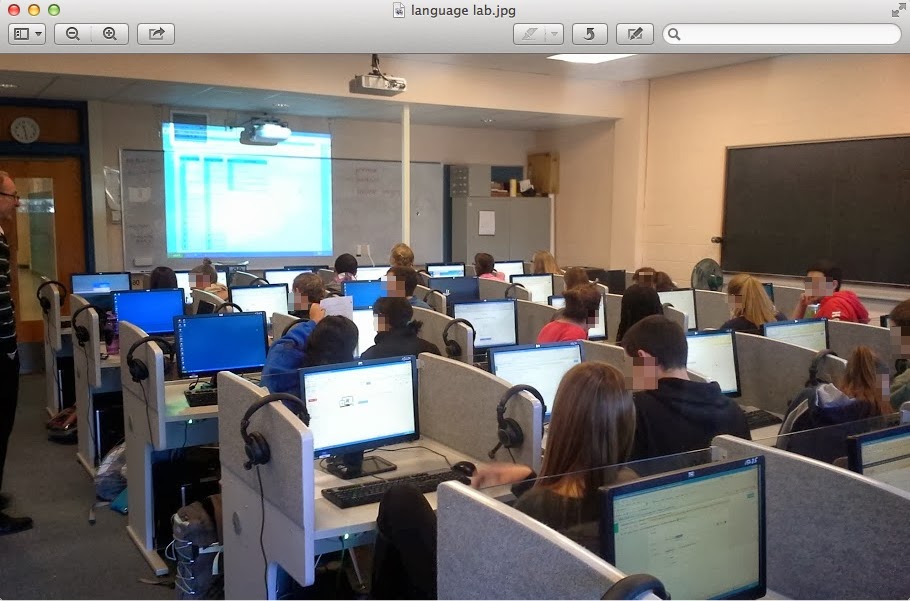
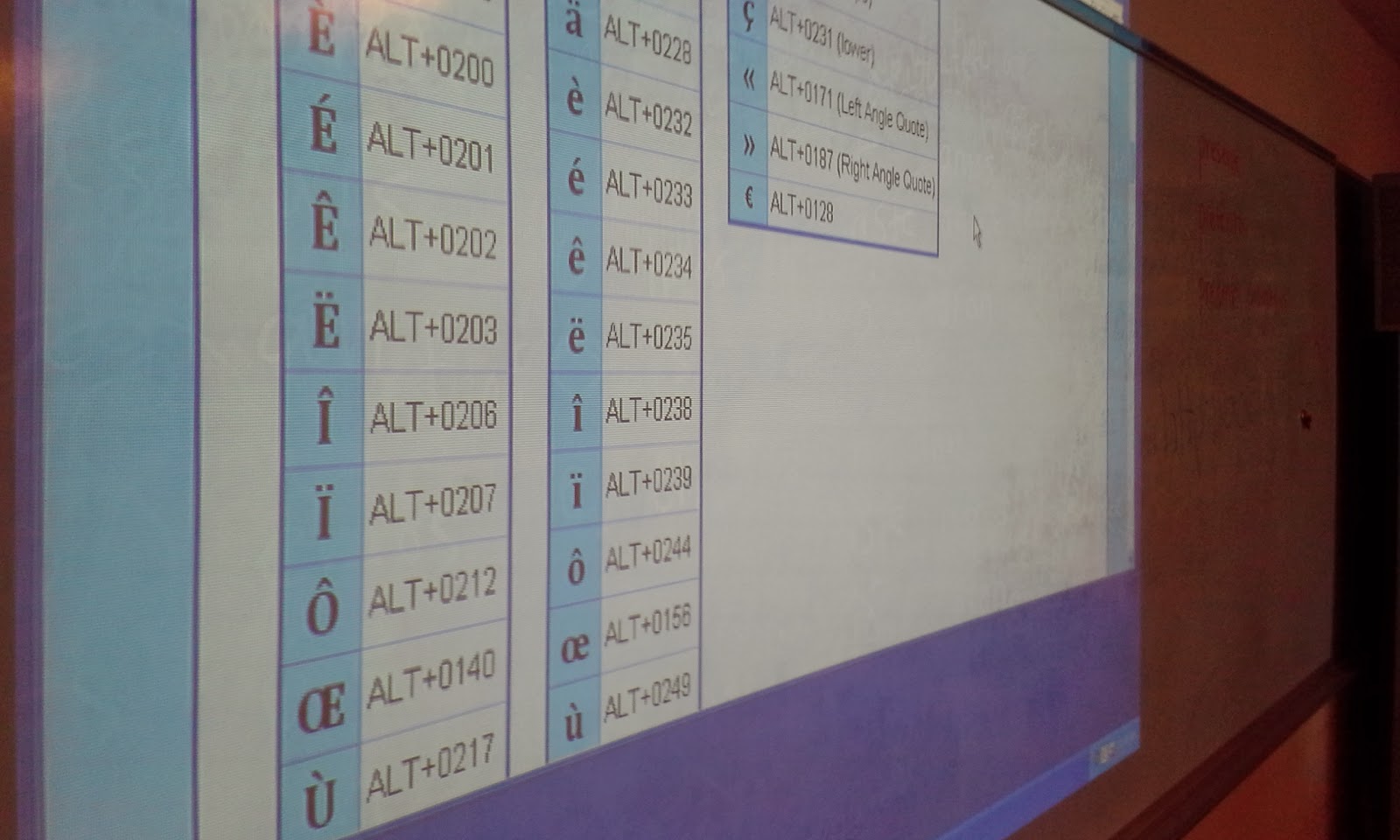
One of the most interesting components of this lesson was teaching students how to add the accent to specific letters in the French language using the American keyboard. We used a webpage with the keyboard shortcuts on the board to assist students with what they needed to type in order to get the accent to show. Many students entered their survey questions in a very expedient way and successfully created their forms. I then was able to show them the live link in which they could then share their form with anyone. I had them copy their link and add it to a document in which I shared with them. Students enjoyed editing the document collaboratively and seeing live the addtion of each survey to the shared document. The final document had all of their surveys links and names on it. I shortened this link and made it so the French teacher could then share these surveys with another class in France to comlete so that the American students could review the responses.


The students in this class were now easily able to share their surveys with each other and were able to practice creating them using a tool which was intuitive and allowed them to create a variety of questions(multiple choice,text,paragraph,checkboxes,drop down,grid,choose from a list,scale). The sharing feature is valuable in that a variety of settings can be set once and editing by different people can be controlled. The person who created the form or anyone else can edit or not based on the settings. The form can be made available to the public or kept private. Google enables specific editing features for each document created.


The opportunity to use the language lab was a great benefit to this group of students. This lesson could be done in any computer lab or classroom which has internet access. Google Docs provides a great free way to create surveys or web-based forms in which you can collect data about a variety of subjects. It is very user-friendly and with just a few simple steps can be applied to almost any classroom. It can be used to help with assessment by creating test or quizzes or even in a flipped classroom model so that students can answer questions at home and then have a discussion about them when they get to school.

Friday, November 22, 2013

An Introduction To Net Texts Online/Flipped Classroom Learning Platfrom

The uniqueness of Net Texts is the ease of applying outside content to the organization of units or lessons online. Net Texts enables students and teachers to work from one portal and simplifies the process for teachers who want to work from one device or are part of a district 1:1 implementation. Net Texts has integrated a variety of different tools from the web such as Khan Academy,CK-12 and made these resources easily searchable for teachers. The interface allows for adding content in an organized efficient ways and streamlines the process of adding videos,lectures and course documents and assessments in purposeful and meaning full ways online. Teachers have access to existing web based course collections as well as the opportunity to design the course from the bottom up using resources collated from the web.

The Net Texts students view on devices(Android,Ipad application) is organized and clearly outlines the course content,videos and documents. Teachers can receive emailed spreadsheets of student results in their portal as well. Like many current note taking applications Net Texts interfaces are consistent between devices and enables students to quickly add notes and find course materials efficiently.

Net Texts is ideal for districts looking for a singular interface for students to interact with course content and also streamlines how teachers organize online content. This tool is ideal for balancing the learning curve for teachers in creating a flipped classroom mode and enables sharing,content management and specific subject area materials. This tool is even more beneficial for teachers who truly know how they want to organize their flipped model and can draw their course materials from previous materials(speadsheets,docs,pdf) and have a strong plan for the organization of lessons and what resources will be necessary to teach a lesson and keep it aligned as they move forward. Newer teachers would want to plant specifically around the content they may want for their course before they fully committed to designing the course. 

The application has a main dashboard which allows teachers to mange what content and what web based materials support the flipped classroom instruction. Different flipped models could be used with this tool as well and instruction could be based on singular components of media being assigned for homework and then viewed in class or a teacher could develop a hybrid based on the accessibility of tablets or computers for student access and use Net texts as tool to assit in connecting to specific material.

Ultimately it is still up to the teacher to create the collaboration this tool would bring to the classroom. Teachers need to find resources which support their instruction or have additional professional development which supports them in creating screencast videos or managing a variety of web based documents such as pdf's,images and docs. 

Net texts supports the integration of OER resources(open education resources) in order to help organize teachers in developing content and choose sources. Some of these source which can benefit a Net Texts users are CK-12 for the sciences,www.net-texts.com/collections,Khan Academy and the OER Commons located at http://www.oercommons.org . Net texts is looking to assist in applying these resources to their platform as quickly as possible to assist in integration of their platform.

One of the largest  benefits for this platform is the ever evolving development of trusted web based materials which teachers can search and utilize quickly to develop a new course or assist a teacher created lesson.  After attending a training with the Net Texts Marketing staff I could recognize their commitment to embracing the use of the Creative Commons and building in this important component into their tool. Their staff highlighted in their presentation several videos and engaged in rich discussion about this feature. I have included links to this information as well as Net Texts youtube video. 
search.creativecommons.org
Mowhawk Video video on Creative Commons
Net Texts 

Sunday, November 17, 2013

What Is The Andover Innovation Lab?

What Are We About!

The Andover Innovation Lab is a unique opportunity for students who wish to develop their own independent technology driven project. Students have the opportunity to come to the Innovation Lab and create a proposal for a self driven project. Students are also mentored and supported by experienced technology educators who can assist them at finding the resources and tools to complete their projects and create real world experiences. This includes reaching out and making real world connections for potential internship experiences,professional connections and personal growth.

If you are a student in Andover High School or you know a student who would benefit from the great benefits of a personalized,self directed and technology rich experience let them know about this opportunity. The students participating in the Innovation Lab also serve as the first line of support for the student run help desk. Students can expand knowledge in the areas of networking,hardware and also troubleshooting technical issues.

Potential Independent Projects Include:


  • Developing A Mobile Application or Web Based Application
  • Creating A Website Or Blog For A Business or Personal Interest
  • Developing  A Game or Multimedia Project
  • Developing A Network Design Plan
  • Building Computers or Studying Hardare
  • Learning More About Social Media & Professional Networking
  • Using Lab Time To Work On The Technology Centered Components of Another School Projec