Showing posts with label forms. Show all posts

Sunday, September 21, 2014

Andover Innovation & Instructional Technology Update Week Of September 8-12 2014 - Google Galore At Andover High School!!!!

The Andover Innovation Lab students have been busy pushing things forward and developing materials for students and teachers to adapt to the use of new technology. I began working with Eli Gukovsky on a script to help teachers sign out laptop carts using a form from their computers. Eli is using Google scripts which is a web based coding platform built into Google Docs which enables the documents to work together to move data for different uses. For more information I highly recommend this link from the Google team which explores the use of Google scripts more in depth.

Overview From Google I/O

Developer Quickstarts From Google


We have enabled students to post their blogs as authors this year which has streamlined the process of our collaborative blog. Students can now work on their blogs in docs and post as they please and wait for approval. This has enabled me to better manage the blogging part of our program and empowered the students with access.

Andrei Dumitrescu has begun the download the components of the Android Studio to his personal laptop. Android Studio is the Android Platforms web based development environment for mobile applications which updates automatically and supports the newest version of Android. I look forward to supporting Andrei as he begins work with this platform. We are also lucky to have other students who have experience working with the platform from last years help desk.
Adam Yee is translating his interest in Sports Statistics to a project in the Andover Innovation lab. it is great to see a student translate skills and interests from different areas into the application of technology. He is currently finding ways to present the that he is collecting and working on organizing it as a technology driven project.


We closed the week working on  video series on Turnitin software and also Google Groups. We completed both of these projects and look forward to seeing the students work on their own projects this week and move them forward in the development phases to choosing formative projects.


Dan Brennan Video Production Teacher at Andover high School has been greatly beneficial as a part of the Andover Innovation Team. He has helped better integrate the use of video tools into our videos and help us document the student learning and experiences with video.

Andover Innovation Tutorial Lead


Teacher Development & Learning


The library has added an additional 3 carts of MacBooks for the Computer Science, Science and Writing Lab. These carts will be an invaluable resource for teachers being able to integrate technology into their classroom. It also solidifies the library as a learning hub for students.


I had the great opportunity of working with Diana Zawil on the creation of a blogger blog for her Spanish 2 courses. Diana had a great vision for what she wanted on her blog and just needed a little introduction to the Blogger platform to move forward. i was very impressed with her detail and choice of web 2.0 tools she integrates into her classroom. Here is a link to class blog which is fantastic!

Brian Shea integrated the use of Google Docs into his program with the National Honor Society. Brian created a form to share with all of the potential members of NHS to accept their application materials. He is also utilizing the features of Google Drive to receive video submissions from students. he is benefiting greatly from the efficiency that these tools have added to this process.


Jackie Salvensen worked on creating a working document to help organize her videos amongst teachers in the health dept. This web based document will enable with one clip to share the collected video links of her department. Her next step was beginning to upload her old Word Documents into Google Drive to Share.


Worked with Louise Cummings on calendars and collaboration in the Transitions classroom this week. She plans on integrating Google tools to share calendars as well as collect important information with Google Forms which will help organize her classroom. She is a huge fan of the collaboration ability Google provides with its tools. I expect that I will really see her classroom change as she moves forward.

We are really progressing with the use of technology and enhancing student and staff communication with the use of Google. Moving forward i can only see more of these tools being used as they truly simplify our worklflow in all that we do.

Thursday, September 18, 2014

Google Apps Script


I’ve been having a lot of fun this year. I’m the only student who was at the help desk last year. The help desk is more organized this year, and I have non-project responsibilities now. Me and Will made a webcast for the teachers on how to use Google Forms. I also made a Google Form / Google App Script for the teachers to sign out the mac carts. Google App Scripts was easy to learn because it has the same syntax as Javascript (ECMAScript 5.0). It was fun making a small project for the school. There are many more people this time. Last time, I was the only student in the Lab, but now I’m joined with a lot of others. So that’s my first 2 weeks so far, I spent most of it on the script.

I still am not so sure what I want to make, though it'll probably be an RPN calculator made in several languages. An example RPN calculator:

Wednesday, January 8, 2014

Continued Development On An Adroid App / Eli Gukovsky

I have been spending a month here doing a lot of fun things. When I started doing this class, I expected a strict programming course, which I would smile and nod with, then go home and experiment with. Instead, I found that I could do all of my experimenting here, and I could get a feel for the technology that I wanted to learn in the same environment that I was actually learning it in. Mr. Downs and Zach have been nothing but kind and funny, with each of them having a very outgoing personality.
Early on, I decided to create a trivia game for Android, where the questions that are asked have no realistic answer that the user might know. This came as a combination of ideas from me and my friends. I love Android Design, so Android vs. iOS wasn't even a question for me. I've watched a lot of Android Design in Action (https://www.youtube.com/playlist?list=PLWz5rJ2EKKc8j2B95zGMb8muZvrIy-wcF), so the design itself wasn't a problem for me. I created a design using a Google Slides designer I found online a while back, and I finished designing the app. The next stage for me is to actually code the app.
So far, I'm really enjoying this class, it's the thing I look forward most to during my day.

Wednesday, December 18, 2013

My First Week At The Andover Innovation LAB & Help Desk

    The first week here at Andover High was certainly eventful in every way. When I first walked into the position, I did not have any notion of what to expect. It wasn't until I met Dan and some of the hard working students in the IT Help Desk that I realized I was in a for a good one year contract. Between the flexibility and the respect I obtain from others, working at the Andover Help Desk certainly does more than being a better job than pushing carts at retail stores in the snow.

    During the first week here, I worked mostly on the Google apps and helped Viabav, John, and Eli work on their projects as well as providing them feedback on their work at a college/professional level. Working with students is a lot of fun, especially when they are willing to learn about things I have went over during my time in college. Sometimes students need someone from a similar generation to their own to assist them in the new technology in our current age, such as the Google apps.

    Having graduated college with a Bachelor' degree and trying to familiarize myself with the professional atmosphere in the Multimedia world, working at a High School with Dan and the students is an excellent way for me to learn more about the field as well to to teach others. Over all, I'd day I enjoyed my first week at Andover High, and I can looking forward to what the rest of the year has to offer! 

Thank you for reading my blog entry,
Zach

Sunday, November 24, 2013

Integrating Google Docs Into The French Foreign Language Classroom-Andover High School Instructional Technology

I recently had the opportunity to assist a French teacher with introducing Google Docs for creating a survey in his French classroom. Prior to me coming to his classroom and working with his students we discussed how we could use Google Docs so that students could share surveys that they create in French with each other more easily. The French teacher also wanted to streamline the process of having availability all of the surveys available on the web organized by class. This teacher was very open to the different possibilities of using Google Docs for integrating these surveys in his classroom.


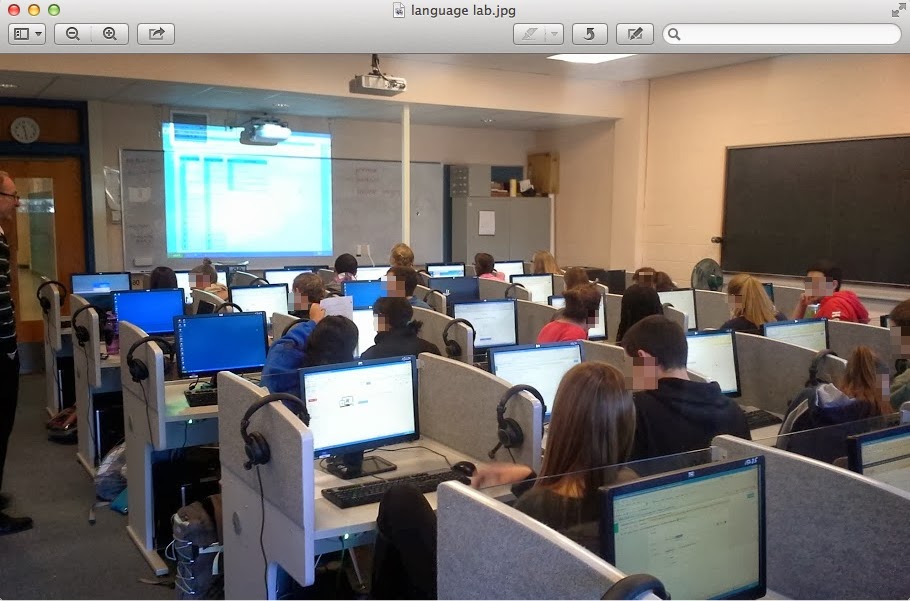
Prior to me coming to his classroom the students typed up the surveys in Word document format. To assist this teacher I came into the classroom to coteach and show the students how to create a Google form and how to edit the different types of questions and explain how they had many options. Students learned how to create a form, change the name of the form as well as choose a template for the appearance. Even though I knew Google Docs to be very popular tool amongst high school students I was very surprised that many had not created a form before. The students did a great job working within the Google interface and the options for forms is very intuitive and allows them to choose the different types of questions(multiple choice,text,paragraph,checkboxes,choose from a list). Form questions also enable for adding help text to each question and also gave an options for whether or not the question was required or not.


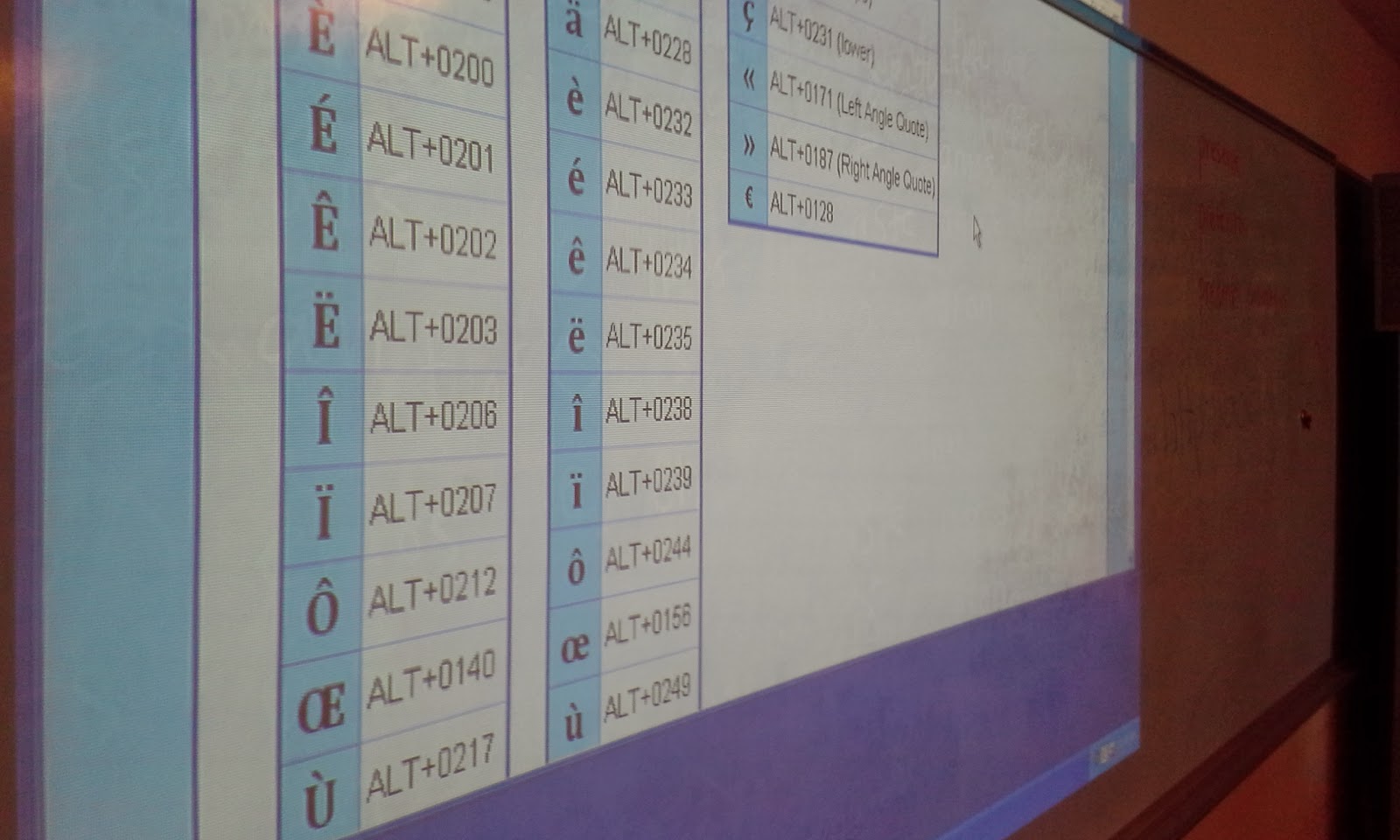
One of the most interesting components of this lesson was teaching students how to add the accent to specific letters in the French language using the American keyboard. We used a webpage with the keyboard shortcuts on the board to assist students with what they needed to type in order to get the accent to show. Many students entered their survey questions in a very expedient way and successfully created their forms. I then was able to show them the live link in which they could then share their form with anyone. I had them copy their link and add it to a document in which I shared with them. Students enjoyed editing the document collaboratively and seeing live the addtion of each survey to the shared document. The final document had all of their surveys links and names on it. I shortened this link and made it so the French teacher could then share these surveys with another class in France to comlete so that the American students could review the responses.


The students in this class were now easily able to share their surveys with each other and were able to practice creating them using a tool which was intuitive and allowed them to create a variety of questions(multiple choice,text,paragraph,checkboxes,drop down,grid,choose from a list,scale). The sharing feature is valuable in that a variety of settings can be set once and editing by different people can be controlled. The person who created the form or anyone else can edit or not based on the settings. The form can be made available to the public or kept private. Google enables specific editing features for each document created.


The opportunity to use the language lab was a great benefit to this group of students. This lesson could be done in any computer lab or classroom which has internet access. Google Docs provides a great free way to create surveys or web-based forms in which you can collect data about a variety of subjects. It is very user-friendly and with just a few simple steps can be applied to almost any classroom. It can be used to help with assessment by creating test or quizzes or even in a flipped classroom model so that students can answer questions at home and then have a discussion about them when they get to school.