Showing posts with label google. Show all posts

Friday, May 15, 2015

Google "Keep" A Friendly New Way To Manage Your Life Of Lists, Notes, Photos, To-Do's


Google Keep is an amazing little web based note taker!

 I can understand now at this point that inviting a new app into your live to keep lists and reminders is a crowded space. But I really want to open your minds to this one. Google Keep has some tremendous benefits for the super busy person who wants labeling in one place.


  • Syncs across Google Accounts, Allows Sharing and Exporting to Google Docs
  • Provides Notifications and Reminders
  • Allows for labeling, labeling
  • Creating checkboxes and crossing items off of your list without losing the item.
  • Allows for archiving, changing of list color and email sharing.
  • Has nice smooth web and desktop interface linked with your Google Account.
  • It can also be added as a shortcut to your Google Apps(The same place you find Drive and Docs).


I was slow to start using Google Keep as it was very similar to Evernote in its features but as a dedicated Google Docs user the creation of Docs from my lists was the biggest selling point. Additionally, the ability to have a cross platform application that syncs with my Google Desktop as an option makes efficiency when moving from location to location amazingly simple.


Desktop View Of Google Keep


I have used this app to share lists which are constantly evolving and changing in real time. I have also used this list maker to more easily enable blogging on the run and turning into a Google Doc in a click of a button.


So go ahead download the "Keep" app from Google Play or find the 3rd party "Go Keep" app from the App Store and test out the sharing of lists,notes,photos and whatever your heart desires across email accounts.


Also be sure to view your synced desktop version when logged into your Google Account.


https://keep.google.com/

I think may find yourself returning to it before you know it as your go to list maker/ creative space.

Sunday, September 21, 2014

Andover Innovation & Instructional Technology Update Week Of September 8-12 2014 - Google Galore At Andover High School!!!!

The Andover Innovation Lab students have been busy pushing things forward and developing materials for students and teachers to adapt to the use of new technology. I began working with Eli Gukovsky on a script to help teachers sign out laptop carts using a form from their computers. Eli is using Google scripts which is a web based coding platform built into Google Docs which enables the documents to work together to move data for different uses. For more information I highly recommend this link from the Google team which explores the use of Google scripts more in depth.

Overview From Google I/O

Developer Quickstarts From Google


We have enabled students to post their blogs as authors this year which has streamlined the process of our collaborative blog. Students can now work on their blogs in docs and post as they please and wait for approval. This has enabled me to better manage the blogging part of our program and empowered the students with access.

Andrei Dumitrescu has begun the download the components of the Android Studio to his personal laptop. Android Studio is the Android Platforms web based development environment for mobile applications which updates automatically and supports the newest version of Android. I look forward to supporting Andrei as he begins work with this platform. We are also lucky to have other students who have experience working with the platform from last years help desk.
Adam Yee is translating his interest in Sports Statistics to a project in the Andover Innovation lab. it is great to see a student translate skills and interests from different areas into the application of technology. He is currently finding ways to present the that he is collecting and working on organizing it as a technology driven project.


We closed the week working on  video series on Turnitin software and also Google Groups. We completed both of these projects and look forward to seeing the students work on their own projects this week and move them forward in the development phases to choosing formative projects.


Dan Brennan Video Production Teacher at Andover high School has been greatly beneficial as a part of the Andover Innovation Team. He has helped better integrate the use of video tools into our videos and help us document the student learning and experiences with video.

Andover Innovation Tutorial Lead


Teacher Development & Learning


The library has added an additional 3 carts of MacBooks for the Computer Science, Science and Writing Lab. These carts will be an invaluable resource for teachers being able to integrate technology into their classroom. It also solidifies the library as a learning hub for students.


I had the great opportunity of working with Diana Zawil on the creation of a blogger blog for her Spanish 2 courses. Diana had a great vision for what she wanted on her blog and just needed a little introduction to the Blogger platform to move forward. i was very impressed with her detail and choice of web 2.0 tools she integrates into her classroom. Here is a link to class blog which is fantastic!

Brian Shea integrated the use of Google Docs into his program with the National Honor Society. Brian created a form to share with all of the potential members of NHS to accept their application materials. He is also utilizing the features of Google Drive to receive video submissions from students. he is benefiting greatly from the efficiency that these tools have added to this process.


Jackie Salvensen worked on creating a working document to help organize her videos amongst teachers in the health dept. This web based document will enable with one clip to share the collected video links of her department. Her next step was beginning to upload her old Word Documents into Google Drive to Share.


Worked with Louise Cummings on calendars and collaboration in the Transitions classroom this week. She plans on integrating Google tools to share calendars as well as collect important information with Google Forms which will help organize her classroom. She is a huge fan of the collaboration ability Google provides with its tools. I expect that I will really see her classroom change as she moves forward.

We are really progressing with the use of technology and enhancing student and staff communication with the use of Google. Moving forward i can only see more of these tools being used as they truly simplify our worklflow in all that we do.

Thursday, September 18, 2014

Google Apps Script


I’ve been having a lot of fun this year. I’m the only student who was at the help desk last year. The help desk is more organized this year, and I have non-project responsibilities now. Me and Will made a webcast for the teachers on how to use Google Forms. I also made a Google Form / Google App Script for the teachers to sign out the mac carts. Google App Scripts was easy to learn because it has the same syntax as Javascript (ECMAScript 5.0). It was fun making a small project for the school. There are many more people this time. Last time, I was the only student in the Lab, but now I’m joined with a lot of others. So that’s my first 2 weeks so far, I spent most of it on the script.

I still am not so sure what I want to make, though it'll probably be an RPN calculator made in several languages. An example RPN calculator:

Saturday, September 6, 2014

Instructional Technology & Digital Learning Update Andover High School Week Of August 25-28 2014

Over the course of the summer I had d the opportunity to teach ,develop new curriculum and view the transformation of a variety of classroom and library spaces for the Andover Public Schools Digital Learning Department.

Summer Work
I taught a Web Design & Development course at Minuteman High School for 3 weeks which enabled me to review and research new tools for the new Web Development course  which is going to be rolled out this fall at Andover High School. The Web Design & Development course is one of 3 new courses which in include Game Development and Exploring Computer Science course. These courses are part of the newly formed Digital Learning Department at Andover High School.


As preparation for the new Exploring Computer Science course I participated in a great  training at Google in August with the new Digital Learning Teacher Michael Messina. We were
not only able to witness the “Google “ work experience but also got great training in making computer science more equitable for a wide range of students. The experience at Google was fantastic and getting to know many of the other teachers participating in this opportunity was extremely rewarding.


Early in the summer I was able to use mobile application development curriculum that I had been developing with a grant with the National Science Foundation and Bunkerhill Community College. The course uses video screencasted tutorials and sequenced code lessons to enable students to create an Android Mobile Application. This was a rewarding opportunity to begin teaching this curriculum  which I had been  developing with a former student of mine over the past year.

Teacher Successes 2013-2014
I was also able to reflect on the success of the teachhers with technology at Andover High School. So many teachers challenged themselves with adopting Google Docs and so many new web 2.0 tools to enhance their teaching. The students who participated in the first year of the Andover Innovation Lab produced so many amazing projects and experiences. Moving forward I have created a new website to showcase their writing and projects anoverinnovation.com. We are excited to be scheduled to present at the Masscue conference in October and be a part of their student showcase and help desk.


In addition to the new website we plan on having a theme introduced each year for students to investigate.  This year we are embracing the theme of creative coding. Students can research open source programming languages to create graphics. Students will have the option to pursue this as opposed to their own tech study. Additional new initiatives for the help desk this year includes a  plan to integrate group webcasts on instructional technology topics. We want to continually bridge the gap between students skills and application of technology and the teacher’s use in the classroom.

Prototype Classrooms
At the close of the last school year an opportunity arose to update 3 classrooms at Andover High School as well as the Media Center with 21st century learning furniture. During the month of August furniture was dilligently put together and represent three prototype classrooms. The classrooms are aimed to be models of furniture which supports learning with technology and also making classrooms more adaptable and flexible to group learning.


In two English classrooms and one math classroom students have some pretty cool new desks and tables. The library also has new tables and chairs are on the way to have a new 21st century feel to the space. Moving forward this library space will shift from a static space to one in which it will be easier for students to use their laptops and other computing devices to research,communicate and collaborate. We look forward to seeing this space transform.


Wednesday, May 7, 2014

Andover High School Instructional Technology Update March 24th-28th 2014 Daniel Downs

On Monday of this week I was able to speak with the English Department about the acquisition of District Google Accounts for their department. Their adoption of these tools will enable them to embrace the collaborative tools like shared documents,spreadsheets,forms and drawing tools. Several of the teachers are already using Google to do collaborative work with Google Documents and also using the Drive feature to back up existing documents.


On Wednesday I worked with Jorge Allen on the development of the website for the distrcit world languages department. We decided to go with the blogger platform so that district links and releases could be shared easilly and to improve department communication. Jorge has been collecting resources to share out through this platform.
Here is the link to check it out!!!!


On Thursday I had the opportunity to visit the UTeach Program at UMass Lowell with the TSTT(Today’s Students Tomorrow’s Teachers) students from Andover High School. During this day students met with the UTeach Programs Director about how the program at UMass Lowell helps prepare students for teaching in a variety of classrooms and also the licensing needs of teachers in Massachusetts.

This was a great opportunity to visit the UMass Lowell Campus and become acquainted with this great program which really helps assist students who want to become teachers learn not only what skills they will need in the classroom but also what licensure requirements will be necessary.

Tuesday, March 11, 2014

Katherine-Blog Post for the Month of March-Andover Innovation Lab/Help Desk

3.6.14.website skeleton.png
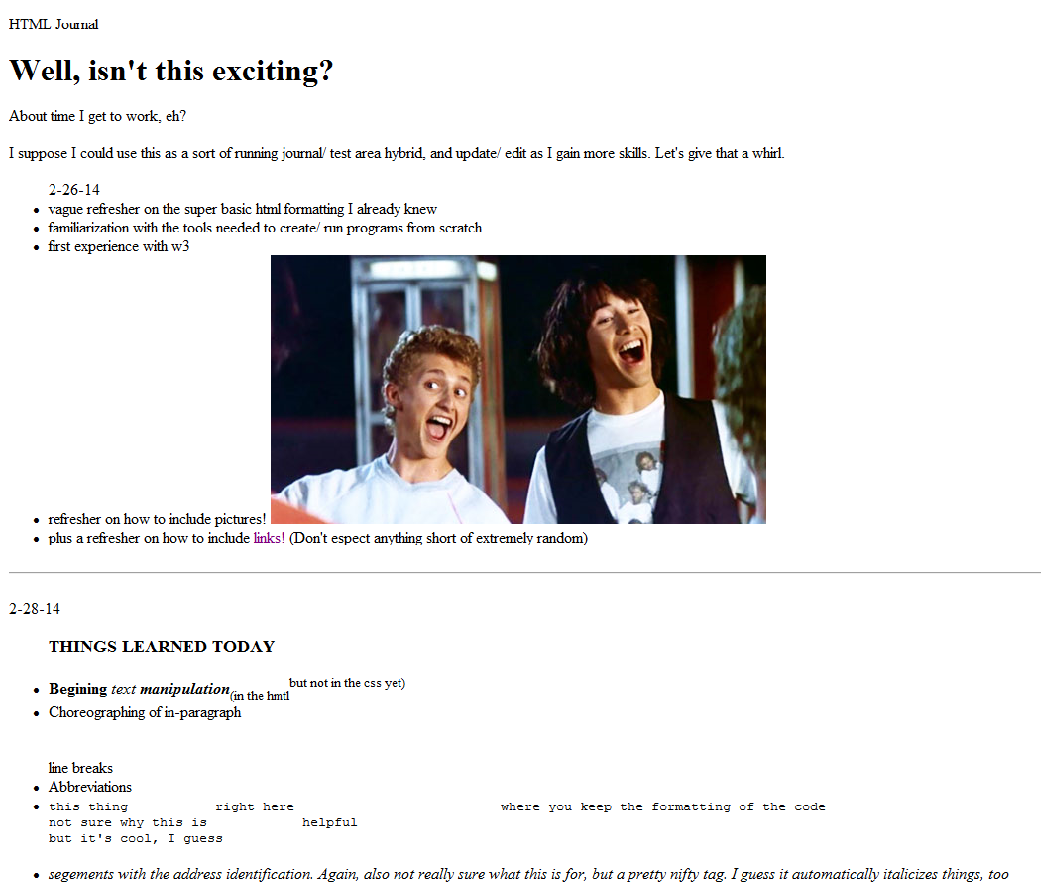
Since my last post, things have been picking up speed. I’ve moved on from my research project and have started to learn HTML online through w3 schools. It’s been good, though I wish I had more time to work each day-- I find that when I use w3 schools within a mere constricting 82 minutes, it’s tricky to strike the right balance between reading new material tutorials and actually practicing the skills I’ve learned. To counter that, I’ve decided to try out the idea of the “HTML Journal”. Theoretically, with the HTML Journal I can both take notes on what I learned that day AND attempt to execute the correct use of those skills, all at the same time! That way, I have a continuous log of concepts learned, with working code (and the accompanying physical results!) to serve as a reference for my work at a later date. Plus, by putting my work each day on a Google Doc, I’m able to access and continue my work at home (on the rare occasion that I’m not drowning in homework.) Although, I will admit that documenting the process of learning HTML from scratch is embarrassingly simplistic  at first. As you can see from the included picture of the fruition of my HTML efforts thus far, I am still far from making an aesthetically pleasing product.

Going forward, I’m looking forward to learning the CSS to bulk up my HTML. I’d say I’m downright anxious to get to CSS, actually, because what I have right now just looks silly. Hopefully, by the time I write my next blog entry, I’ll have learned to integrate CSS well enough to make the skeleton I have now into something that actually looks plausibly legitimate website. I guess that if I start making my website look more professional, I should probably step up the quality of my content as well-- but I’m not ready to give up Bill and Ted or my plethora of goofy links, so I’ll worry about that later. I still have plenty of things to learn before I’ll be nearly close enough to that level of proficiency
.


Friday, January 10, 2014

The Hour of Code Experience at the Andover Innovation Lab / Help Desk / Zachary Griffin

     When I first heard about the Hour of Code, I wasn't quite sure what to expect from it. I assumed many of the students would be working on something that they may find overwhelming and it would turn out to be a very uneventful week. However, I couldn't have been more wrong. The Hour of Code proved to be a much more important experience than I would have anticipated. Our first role at the help desk was to assist Mrs. Reidy with creating a shared Google Form so she could communicate with all students efficiently. We also created the bit.ly link (bit.ly/ahshourofcode) so students could access the document with friendly URL. 

     Dan Downs and I worked in the Library and several other classrooms supporting large amounts we were assigned to during the Hour of Code. Our role was to provide students with the link to the Google form and to begin students with specifically assigned activities for the Hour of Code website. When working with these students, we had our students from the Help Desk like Eli, Viabhav and John assist us in guiding students through the various tutorials. Our Innovation Lab/Help Desk students provided pointers to student on how to use the code games effectively and provided necessary support to code newbies.

     Many of the students did not quite understand HTML, Javascript or CSS, so it was generally expected that they were going to struggle a bit. However, the links to the Hour of Code website that Mrs. Reidy provided made the lessons much more entertaining for the students. Some of these videos included navigating an Angry Bird character through a field using pre-built HTML that players would move over into a drop box. Indeed, the lessons were simple, but informative enough for anyone inexperienced in code to understand.

     Overall, the Hour of Code is something anyone should take a part in. It's both a great way to learn how to code and a good way of having a little bit of fun. All the students did an excellent job in providing students in working with the tutorials chosen for the Hour Of Code. Many of the Teachers around the school did a wonderful job proving support in teaching their students during the Hour Of Code.

If you are interested in seeing the Andover High School Google Doc used for the classes, click on the link below:

If you would like to learn more about the Hour of Code, click here:

If you learn the Hour of Code, you may also even be awarded with a certificate that you can add to your portfolio!

Wednesday, January 8, 2014

Continued Development On An Adroid App / Eli Gukovsky

I have been spending a month here doing a lot of fun things. When I started doing this class, I expected a strict programming course, which I would smile and nod with, then go home and experiment with. Instead, I found that I could do all of my experimenting here, and I could get a feel for the technology that I wanted to learn in the same environment that I was actually learning it in. Mr. Downs and Zach have been nothing but kind and funny, with each of them having a very outgoing personality.
Early on, I decided to create a trivia game for Android, where the questions that are asked have no realistic answer that the user might know. This came as a combination of ideas from me and my friends. I love Android Design, so Android vs. iOS wasn't even a question for me. I've watched a lot of Android Design in Action (https://www.youtube.com/playlist?list=PLWz5rJ2EKKc8j2B95zGMb8muZvrIy-wcF), so the design itself wasn't a problem for me. I created a design using a Google Slides designer I found online a while back, and I finished designing the app. The next stage for me is to actually code the app.
So far, I'm really enjoying this class, it's the thing I look forward most to during my day.

Friday, December 20, 2013

Wiki Spaces Presentation at Wheelock College TSTT Conference

     It has been nearly a month when I began my first day at Andover High, and as I look forward to my two week break, I reflect on the time I spent working with Dan and the students on developing professional portfolio pieces in the field of technology. Between the flexible schedules, the presentation at Wheelock College, and the comfortable environment I work in, I can safely say I will not shudder the end of my two week break when the time comes. 

    As of right now, all three of our students will be developing their final projects over both the vacation and the first two weeks after they come back before the next semester. Eli is working on his app for the Android which he is moving on heavily, Viabav is continuing his progress on his Minecraft videos, and John is furthering his skills in code. With all of our students currently focused with interest on their projects, I am confident that they will work hard on their projects during their vacation.

     Here is a link to the program TSTT in Wheelock College, Boston. there I presented the importance of Google Doc's and how students can use them in a professional environment.

Zach

Tuesday, November 26, 2013

Benefits Of Creating Video Lectures & Screencasts-Andover High School Instructional Technology

In the beginning of the school year I had a teacher who is not going to be able to attend parents night but really wanted to connect with parents who came. Our solution for this problem was to have the teacher create a video lecture which contained all the major components of what he spoke about on parents night. The video lecture also contained a link to a public Google document which contained all the necessary forms that he wanted to get out to parents to know about. We then uploaded the video to YouTube which enable to another user to a play the video for what his parents showed up over the course of the evening.

This parents night experience was an interesting way to introduce the power of video lectures to a teacher. By learning how to screen cast lectures teachers can actually increase the amount of time that they have to do other lesson planning or introduction of key concepts to students. Video lectures do need some planning and should contain all the details that you want to have included in a regular lesson lecture. It is also important to require students to take notes and be prepared for a discussion.

It makes a huge difference how much time you spend practicing and preparing for the video lecture. A video lecture which is well-prepared and timed appropriately should include all the components that they would in a regular lesson but can also include links to web based surveys,documents or videos. A video lecture can be loaded with links or assessments which students can prepare for classroom sharing and communication. Performing a few practice run throughs will also improve the quality of your voice and detail to which you can talk about things.

The best part of video lectures is that the tools to make them are free and readily available on the web. My favorite tool for creating video lectures and presentations is Screen Cast O-Matic. I started off with the free version of the software and was very impressed and allowed me to create presentations videos which were 15 minutes in length. I was able to share them and also upload them to YouTube so that I always had a place that I can link them from what I share with my students more quickly. There is also a pro version of screen cast O-Matic for $15 a year. I recommend this version if you are really into adding text, editing your videos more concisely or longer recording time. The pro version also removes of the watermark on the screen that says Screen Cast O-Matic.

If you use the iPad your courses you're definitely going to want to check out an app called Educreations. This application allows you to record on your iPad screen and import images create text and do a variety of speaking over what is projected onto your iPad screen. I recommend this application especially if you work on the elementary level and have some key lessons with you continually use over and over again. If you do a great job of planning out your lessons that you want to show on educreations they could be a great resource for you and also for other teachers you can find them available on the web.

With the development of online classrooms using the flip classroom model I think you going to see more and more teachers using screen cast or video based lectures. This type of sharing of your lectures is great to share your work as well as enable students to have access to your lessons anywhere they go. YouTube is very friendly to uploading these lectures along with allowing you to tag them and make them easily searchable on the web. This feature makes it easy to use YouTube as a homepage for all your video lectures. On Youtube you can then tag them and organize them into playlists.

At Andover high school I have had several teachers create video lectures for their classrooms. video lectures can help increase engagement for students in and out of the classroom. Just remember that isn't it is important to prepare accordingly for how long your presentations going to be what content you want to cover. Also, have a strategy for how you're going to share these with your students quickly and easily. Think about linking them to existing course management systems or even just having a YouTube page where you can find them all.

Personally I like using videos as a form of assessment for student work. I love having the ability to have students sit down and create a voiceover showing the work they've created on the web. This could be how students present a PowerPoint show a website design or even discuss a particular talk it topic using other web based presentation formats. I feel that with screencasts students can talk clearly and concisely about what they want to create and can also show their deep knowledge of what they've been working on. It's also a great opportunity to have students add their personal voice to what they've created. I have included two links to video lectures that teachers have made in my school. If you're more interested in using it as an assessment tool feel free to visit my YouTube page where I have samples of videos in which rubrics are included. There are also videos which show specific components of the rubrics and videos in which students describe the process of completing a project.

Science:

Sunday, November 24, 2013

Integrating Google Docs Into The French Foreign Language Classroom-Andover High School Instructional Technology

I recently had the opportunity to assist a French teacher with introducing Google Docs for creating a survey in his French classroom. Prior to me coming to his classroom and working with his students we discussed how we could use Google Docs so that students could share surveys that they create in French with each other more easily. The French teacher also wanted to streamline the process of having availability all of the surveys available on the web organized by class. This teacher was very open to the different possibilities of using Google Docs for integrating these surveys in his classroom.


Prior to me coming to his classroom the students typed up the surveys in Word document format. To assist this teacher I came into the classroom to coteach and show the students how to create a Google form and how to edit the different types of questions and explain how they had many options. Students learned how to create a form, change the name of the form as well as choose a template for the appearance. Even though I knew Google Docs to be very popular tool amongst high school students I was very surprised that many had not created a form before. The students did a great job working within the Google interface and the options for forms is very intuitive and allows them to choose the different types of questions(multiple choice,text,paragraph,checkboxes,choose from a list). Form questions also enable for adding help text to each question and also gave an options for whether or not the question was required or not.


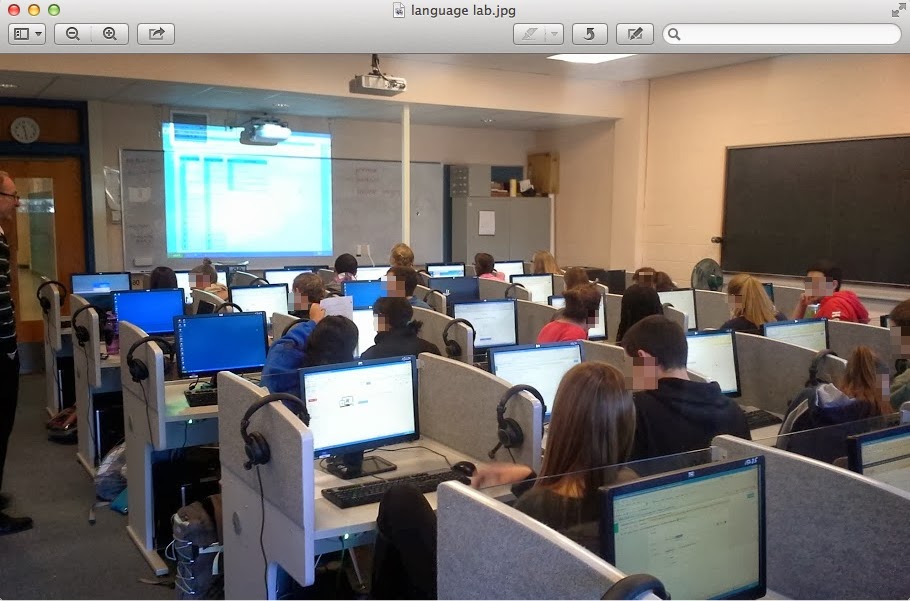
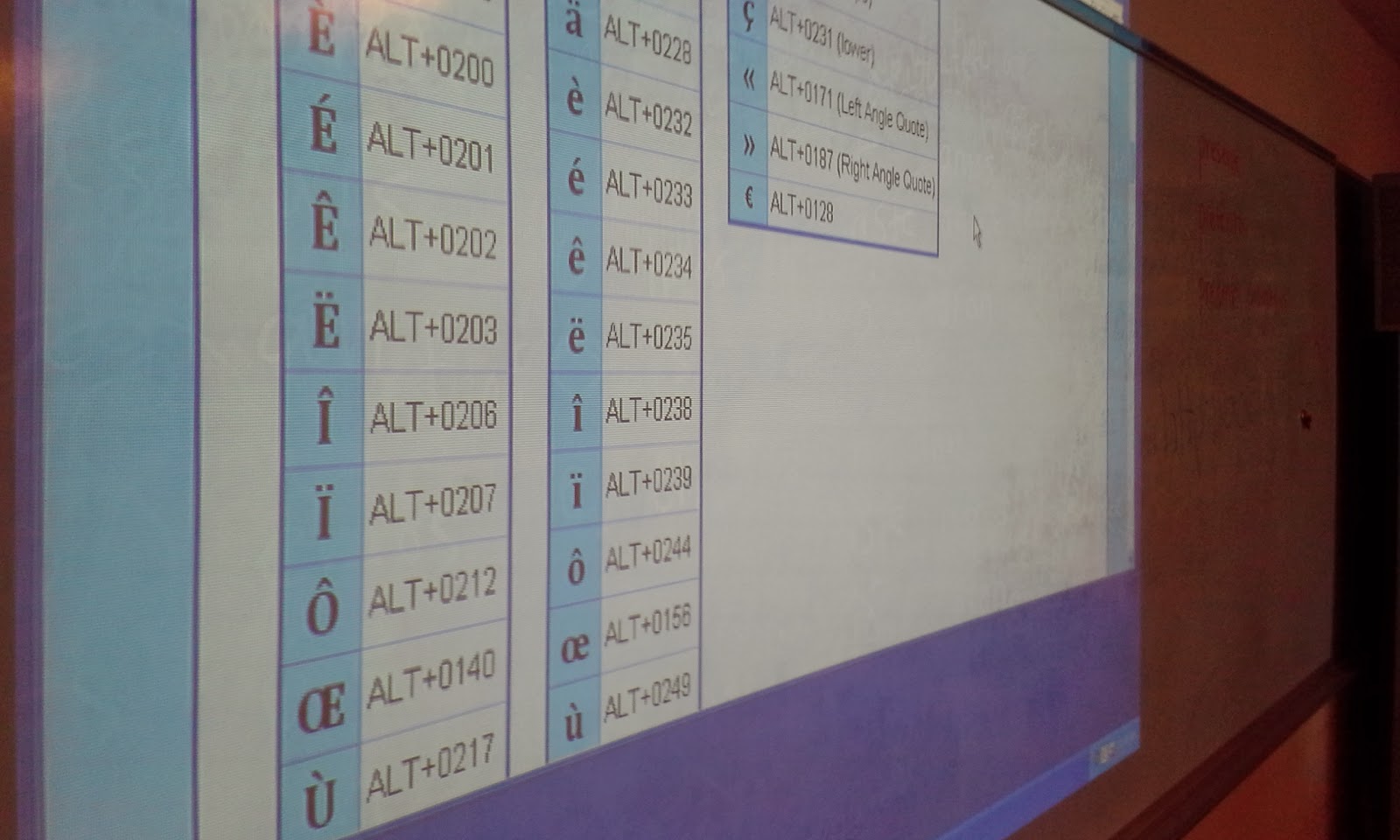
One of the most interesting components of this lesson was teaching students how to add the accent to specific letters in the French language using the American keyboard. We used a webpage with the keyboard shortcuts on the board to assist students with what they needed to type in order to get the accent to show. Many students entered their survey questions in a very expedient way and successfully created their forms. I then was able to show them the live link in which they could then share their form with anyone. I had them copy their link and add it to a document in which I shared with them. Students enjoyed editing the document collaboratively and seeing live the addtion of each survey to the shared document. The final document had all of their surveys links and names on it. I shortened this link and made it so the French teacher could then share these surveys with another class in France to comlete so that the American students could review the responses.


The students in this class were now easily able to share their surveys with each other and were able to practice creating them using a tool which was intuitive and allowed them to create a variety of questions(multiple choice,text,paragraph,checkboxes,drop down,grid,choose from a list,scale). The sharing feature is valuable in that a variety of settings can be set once and editing by different people can be controlled. The person who created the form or anyone else can edit or not based on the settings. The form can be made available to the public or kept private. Google enables specific editing features for each document created.


The opportunity to use the language lab was a great benefit to this group of students. This lesson could be done in any computer lab or classroom which has internet access. Google Docs provides a great free way to create surveys or web-based forms in which you can collect data about a variety of subjects. It is very user-friendly and with just a few simple steps can be applied to almost any classroom. It can be used to help with assessment by creating test or quizzes or even in a flipped classroom model so that students can answer questions at home and then have a discussion about them when they get to school.